
How to Generate Free, Custom Math Worksheets with Answer Keys in 30 Seconds
Tired of paywalls, blurry photocopies, and ad-bloated PDF sites? Discover how elementary and middle school educators generate infinite custom math practice sheets with instant matching answer keys in 30 seconds flat.
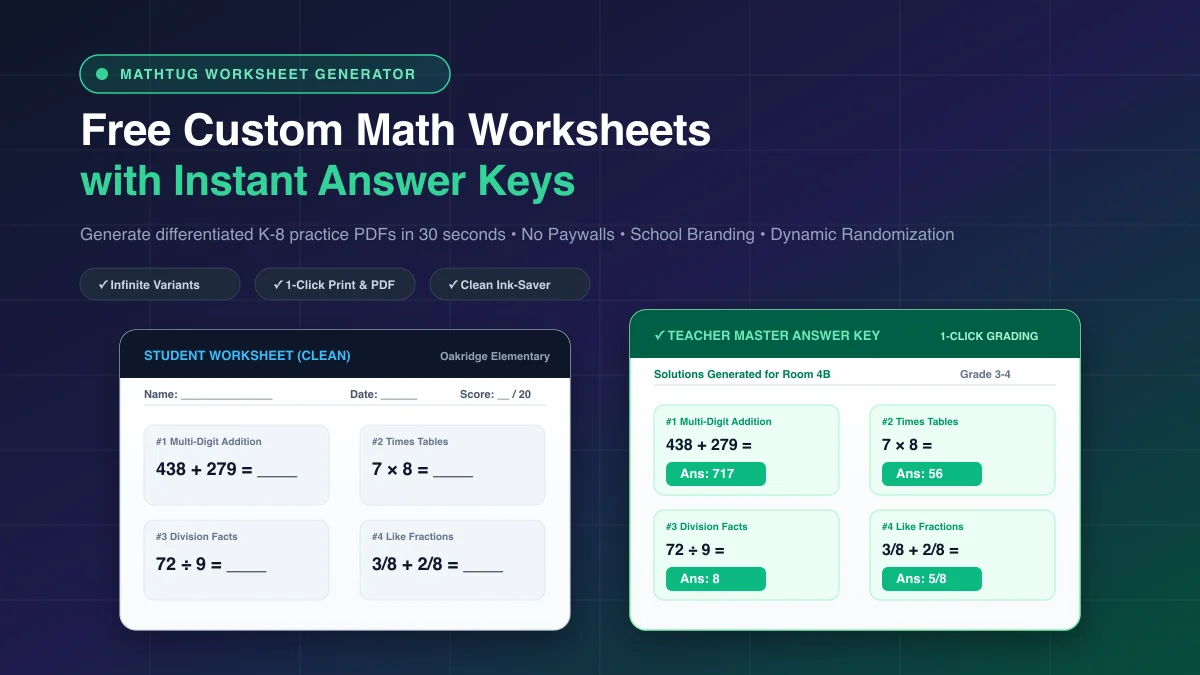
Every Sunday evening, thousands of elementary and middle school math teachers sit in front of search engines typing variations of the same query: "free 3rd grade multiplication worksheets pdf with answers." What follows is an exercise in frustration: subscription paywalls demanding $12/month, blurry scanned PDFs dating back to 2004, download limits after three sheets, and ad-infested pages that print intrusive banner ads straight onto school photocopier paper.
Even when you find a usable static PDF, you immediately face a fundamental pedagogical barrier: static worksheets cannot be randomized. If thirty students sit shoulder-to-shoulder in a busy classroom, identical problem sheets invite wandering eyes and answer copying. If five students fail a formative quiz and need a second-chance remediation attempt on Tuesday, handing them the exact same worksheet tests memorization of previous numbers rather than genuine conceptual mastery.
To solve this, modern educators are transitioning to dynamic, browser-based generators. Using the free MathTug Math Worksheet Generator, teachers can customize problem counts, dial in exact difficulty tiers, personalize school and student headers, and generate infinite non-identical practice sheets with instant matching teacher answer keys in under 30 seconds—with zero logins, zero watermarks, and zero paywalls.
The Cognitive Science of Pencil-to-Paper Math in a Digital Age
With 1:1 Chromebook initiatives, iPads, and interactive Smartboards ubiquitous in modern school districts, some educational theorists predicted the total extinction of the paper worksheet. Yet empirical cognitive neuroscience consistently proves why handwriting numbers on paper remains non-negotiable for elementary and middle school mathematical development:
-
1. Spatial Alignment and Graphomotor Encoding
When solving multi-digit operations—such as multi-digit subtraction with regrouping (e.g.,
503 - 278) or long division—students must physically align digits into columns of ones, tens, hundreds, and thousands. Typing answers on a keyboard bypasses the graphomotor pathways in the brain that encode place value geometry and positional relationships. -
2. Working Memory Offloading
Working memory capacity in young learners is strictly limited (typically holding 3 to 5 items simultaneously). When solving multi-step word problems or fractional additions with unlike denominators, handwriting scratchwork serves as an external cognitive cache. Students write intermediate steps down, freeing mental bandwidth to focus on conceptual reasoning rather than holding partial sums in memory.
-
3. Error Analysis and Diagnostic Visibility
On a digital multiple-choice screen, a student who guesses or misclicks simply receives a red "X." On a paper worksheet, an educator can inspect the physical pencil strokes: Did the student forget to decrement the tens digit when borrowing across zero? Did they add denominators directly in fractions? Physical paper leaves an audit trail that empowers surgical teacher intervention.
The goal is not to eliminate digital technology, but to create a symbiotic balance: use high-octane gamified platforms like MathTug Classroom Battles for high-energy fact fluency, and pair them with customized, clean paper worksheets for deep procedural calculation.
---The 30-Second Math Worksheet Workflow
Most traditional worksheet websites bury teachers under multi-page questionnaires, broken download links, or email capture popups. The MathTug Free Worksheet Tool was engineered specifically for busy teachers walking up to the photocopier five minutes before the morning bell:
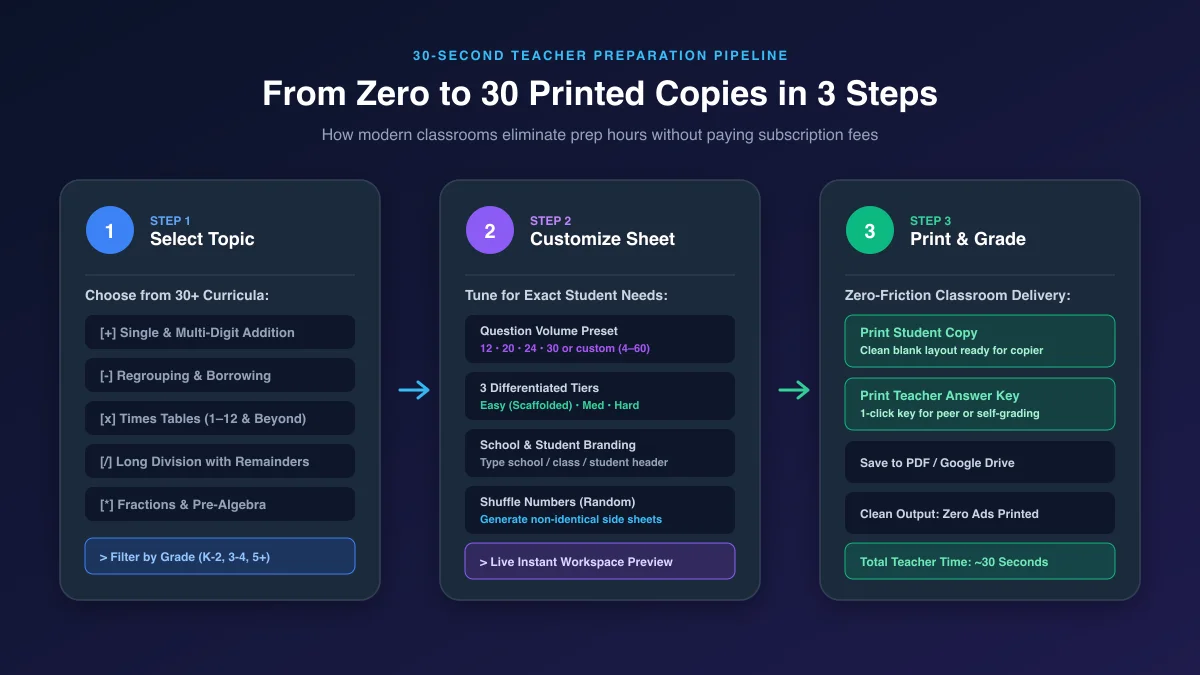
Step 1: Choose Your Curricular Module (30+ Standards-Aligned Presets)
Filter by grade level (K–Grade 2, Grade 3–4, or Grade 5+) or select directly from eight foundational categories:
- Addition: Single-digit facts (sums to 10 & 20), 2-digit without regrouping, 2-digit with regrouping, and 3-digit columnar addition.
- Subtraction: Basic subtraction facts, 2-digit clean subtraction, regrouping/borrowing across tens and hundreds, and subtracting across zeroes.
- Multiplication: Core times tables (1 to 12), multiplication tables 13 to 20, 2-digit by 1-digit, and multi-digit standard algorithm practice.
- Division: Basic division facts, dividing with remainders, 2-digit divisors, and long division drills.
- Fractions: Like denominator addition/subtraction, simplifying fractions, unlike denominators, and multiplying fractions.
- Pre-Algebra: Solving 1-step linear equations, order of operations (PEMDAS), and balancing variables.
- Foundations: Number bonds, skip counting, place value expansion, and rounding numbers.
Step 2: Customize Volume, Difficulty, and School Branding
Once your topic is selected, fine-tune the worksheet to match your exact instructional objective:
- Question Volume: Select quick presets (12, 20, 24, or 30 questions) or enter any custom count between 4 and 60 questions. A 12-question sheet provides generous white space for early elementary students; a 30-question grid delivers an intense fluency sprint for middle schoolers.
- Difficulty Tiers (Easy, Medium, Hard): Scaffold instruction with one click. In single-digit addition, "Easy" restricts sums to 10; "Medium" tests sums up to 18; "Hard" introduces 3-addend equations (e.g.,
6 + 4 + 7 = ___). - Personalized School Header: Type your school name (e.g., "Oakridge Elementary — Room 4B") and student name. The sheet automatically formats an official-looking header complete with Name, Date, and Score lines.
- Shuffle Numbers 🎲: Click Shuffle to recalculate all problem operands instantaneously. Print Version A for odd rows, click Shuffle, and print Version B for even rows to completely eliminate exam copying!
Step 3: 1-Click Print & Matching Answer Key
In the live print preview, educators have two dedicated instant print buttons:
- Print Student Copy Sends a crystal-clear, zero-ad black-and-white worksheet directly to your browser's print dialog, optimized for standard 8.5x11" or A4 paper with ink-saving vector typography.
- Print Answer Key Instantly reveals every problem solution in dedicated answer boxes and triggers the print dialog. Hand this sheet to a teaching assistant, hang it at a self-check station, or keep it on your clipboard for 60-second grading.
How to Implement Custom Worksheets in a 4-Station Math Rotation
Paper practice delivers the highest learning dividends when integrated into a structured, blended learning model rather than used as isolated "busy work." The most successful elementary and middle school classrooms deploy a 60-minute 4-station rotation model (15 minutes per station):
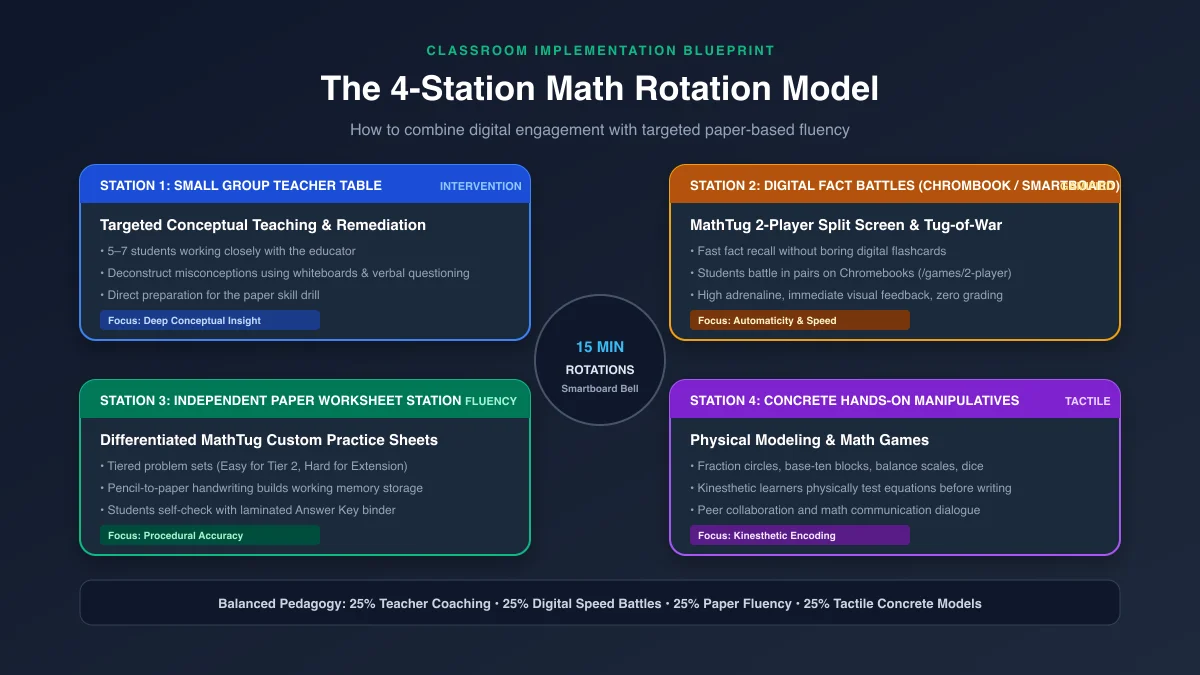
Station 1: Direct Instruction & Remediation Table
The teacher works with a small cohort of 5 to 7 students. Using mini dry-erase boards, the teacher deconstructs misconceptions, guides students through sample problems, and introduces the target strategy (e.g., decomposing numbers or cross-canceling fractions). This station provides the conceptual foundation students need before tackling independent paper problems.
Station 2: Digital Fact Fluency Arena
Students pair up on classroom Chromebooks or laptops at the MathTug 2-Player Split-Screen Arena. Two students share a single device or keyboard, competing in head-to-head arithmetic duels. The game provides instant gamified feedback, builds rapid fact automaticity, and eliminates the monotony of old-fashioned digital flashcards.
Station 3: Independent Practice Worksheet Station
Students sit in a designated quiet zone with their custom MathTug printed worksheet. Because the sheet has been calibrated to their exact instructional level (e.g., 20 questions, Medium difficulty), students work through problems methodically with pencil and paper. To foster metacognition and immediate feedback:
- Place a laminated Teacher Master Answer Key inside a manila folder at the center of the table.
- After completing 5 problems, students open the folder, inspect their answers with a green highlighter, and immediately fix any calculation errors before continuing.
- This self-checking loop prevents students from practicing errors across twenty consecutive problems.
Station 4: Concrete Hands-On Manipulatives
At the tactile station, students use physical tools—fraction tiles, base-ten blocks, balance scales, or dice—to explore the mathematical principle physically. For example, if the unit focuses on balance equations, students physically test weights on a pan balance before transitioning to the MathTug Balance Scale Game.
To keep rotations crisp and synchronized without teacher shouting, project the MathTug Fullscreen Classroom Timer on your front Smartboard set to 15 minutes with chime alerts.
---Head-to-Head Comparison: MathTug vs. Traditional Worksheet Sites
When selecting a worksheet generator for your classroom, pay close attention to paywall restrictions, print formatting, and dynamic recalculation capabilities. Here is how MathTug compares to older worksheet repositories:
| Feature | MathTug.com | Math-Drills | Education.com | Super Teacher Worksheets |
|---|---|---|---|---|
| Cost & Access | 100% Free Forever | Free | Freemium ($12/mo) | $24.95 / year |
| Account / Sign-Up Required | NO (Zero Login) | No | YES (Email capture) | YES (For answer keys) |
| Dynamic Problem Randomization | YES (1-Click Shuffle 🎲) | Static PDFs only | Static PDFs only | Static PDFs mostly |
| Custom Question Counts (4–60) | YES (Fully Flexible) | Fixed (e.g. 100 facts) | Fixed layout | Fixed layout |
| School & Student Custom Branding | YES (Type custom name) | No (Generic) | No | Paid members only |
| Zero-Ad Clean Print Output | YES (CSS Print Isolated) | Yes (PDF download) | Frequent ad bleed | Yes |
| Matching Teacher Answer Key | 1-Click Instant Key | Separate page in PDF | Requires account | Separate link |
Pro-Tips for Eco-Friendly, Ink-Saving Classroom Printing
Classroom printing budgets and paper supplies are perpetual concerns for teachers. Here is how experienced educators get maximum mileage out of generated printables:
-
💡 The Dry-Erase Pocket Hack (Zero Paper Waste)
Print a set of 30 worksheets once. Slide each page into a clear plastic dry-erase sleeve (or standard heavy-duty sheet protector). Students write their answers using fine-tip dry-erase markers and wipe them clean with a sock or felt eraser at the end of the period. A single ream of paper can power your entire school year!
-
💡 Double-Sided "Fluency on Front, Extension on Back"
Generate a 20-question sheet on "Medium" difficulty for Side A (core lesson practice). Then click "Hard", hit "Shuffle", and print a 12-question extension set on Side B. Fast finishers simply flip their paper over and immediately tackle challenging multi-step problems without interrupting your small-group instruction.
-
💡 2-Up Mini Exit Slips
In your browser's print dialog, select "Pages per sheet: 2" and set question count to 8 or 10. Slice the printed paper down the center with a paper trimmer to produce two identical half-sheet exit tickets from a single sheet of paper. (For 100% digital paperless exit tickets, see our companion guide on Digital Exit Tickets for Math).
Frequently Asked Questions (FAQ)
Are all worksheets generated on MathTug completely free to print?
Yes. All 30+ worksheet modules, customization tools, and teacher answer keys are 100% free for public schools, private educators, tutors, and homeschooling families. There are no monthly quotas, subscriptions, or paywalls.
Can I save the generated worksheet as a PDF instead of printing on paper?
Yes! When you click either "Print Student Copy" or "Print Answer Key," your operating system's native print modal opens. Simply change the destination from a physical printer to "Save as PDF". You can then upload the PDF to Google Classroom, Canvas, or Seesaw for digital stylus solving.
How does the "Shuffle Numbers" feature help prevent test cheating?
Unlike static PDF websites where every download contains the identical numbers, clicking "Shuffle Numbers 🎲" on MathTug recalibrates all problem numbers using randomized mathematical constraints. You can print Form A for odd-numbered student desks, click Shuffle once, and print Form B for even-numbered desks. Both forms test the identical skill difficulty, but no two students have identical calculations.
Can I customize the school or classroom name on the printed header?
Yes. Under Step 2 (Customize Worksheet), type your school, district, or classroom name into the "School / Class Name" field. The header automatically formats your custom text cleanly at the top of both the student copy and teacher answer key.
Ready to Generate Your First Custom Worksheet?
Stop wasting your Sunday afternoons hunting through paywalled websites and ad-cluttered PDF archives. Head over to the Free MathTug Worksheet Generator, select your curriculum topic, and generate clean, photocopier-ready practice sheets with instant answer keys right now.
Looking for companion classroom resources? Check out our guides on The 4-Station Math Blended Learning Blueprint, Differentiated Math Instruction for Mixed-Ability Classrooms, 7 Quick 5-Minute Math Bell Ringers, and the Smartboard Noise Meter.
Recommended Hands-on Math & Focus Tools
Top-rated learning tools on Amazon that support the strategies in this article:
📥 Get Our Free Classroom Math Puzzles & Worksheets
Enjoyed this guide? Join our educator community and receive weekly printable activities and mental math worksheets.
About the Author: Shubham
Math Educator & Developer
Shubham is a dedicated math educator and software engineer with a passion for gamifying education. He created MathTug to help teachers and parents utilize interactive digital games on smartboards and projectors to make math learning collaborative, active, and stress-free for kids.
Learn more about our educational mission on the About Us page →Enjoyed this post?
Share it with your colleagues or explore more fun ways to teach math on MathTug.
🎮 Play Games