
The 4-Station Math Blended Learning Blueprint for Elementary & Middle School
Transform your chaotic math period into a calm, synchronized powerhouse. Discover the exact 60-minute 4-station rotation model combining small-group teacher coaching, digital Chromebook battles, targeted paper worksheets, and hands-on manipulatives.
If you have ever attempted to teach a 45-minute whole-group math lecture to thirty mixed-ability students, you know the inevitable outcome: five gifted students are bored to tears and daydreaming, ten students are overwhelmed and mentally checked out, and fifteen students are copying numbers off the front board without understanding the underlying concepts.
Every student learns mathematics at a unique developmental pace. Expecting thirty eight-year-olds or twelve-year-olds to absorb fractions, multi-digit division, or algebraic balancing simultaneously from a single teacher lecture is an uphill battle that exhausts educators and fuels student math anxiety.
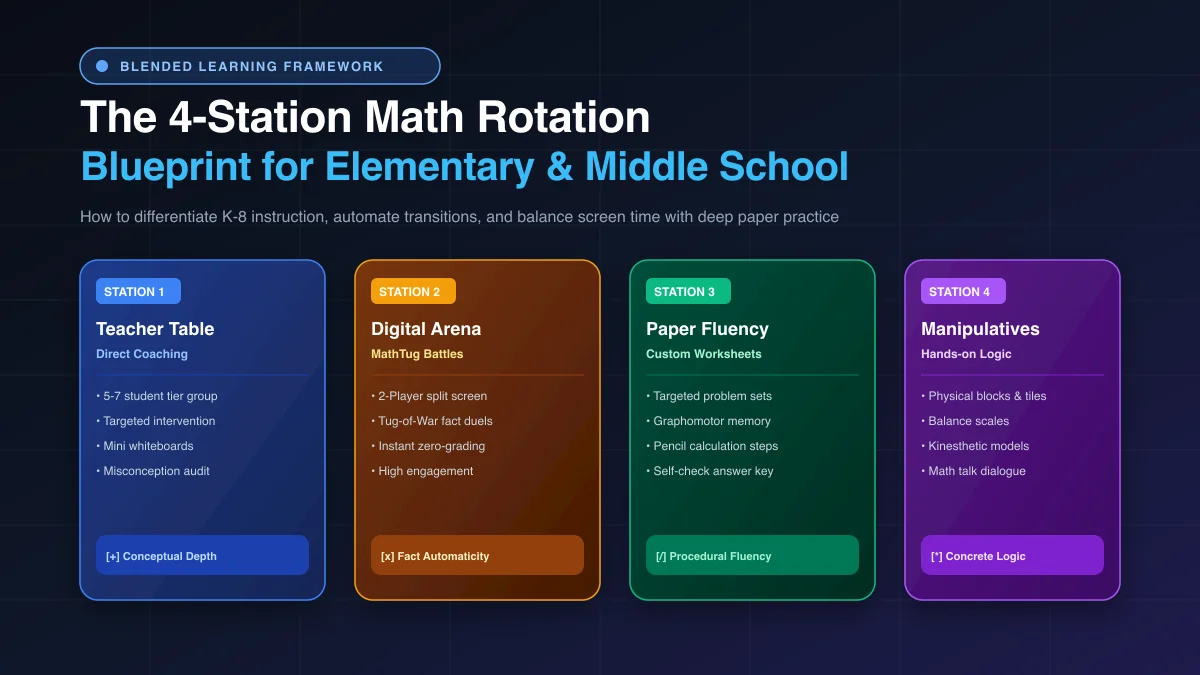
The antidote is the 4-Station Math Blended Learning Rotation Model. By dividing your classroom into small, synchronized cohorts of 5 to 7 students that rotate between direct teacher intervention, high-energy digital fact duels, targeted paper calculations, and hands-on manipulatives, you can deliver personalized, small-group instruction every single day—without increasing teacher prep hours.
The 60-Minute Math Workshop Schedule (Minute-by-Minute)
The most common reason station rotations fail is poor time management: transitions drag out for three minutes, students wander around sharpening pencils, and teachers run out of time before the final rotation. To make the model sustainable, successful classrooms follow a strict 60-minute timetable:
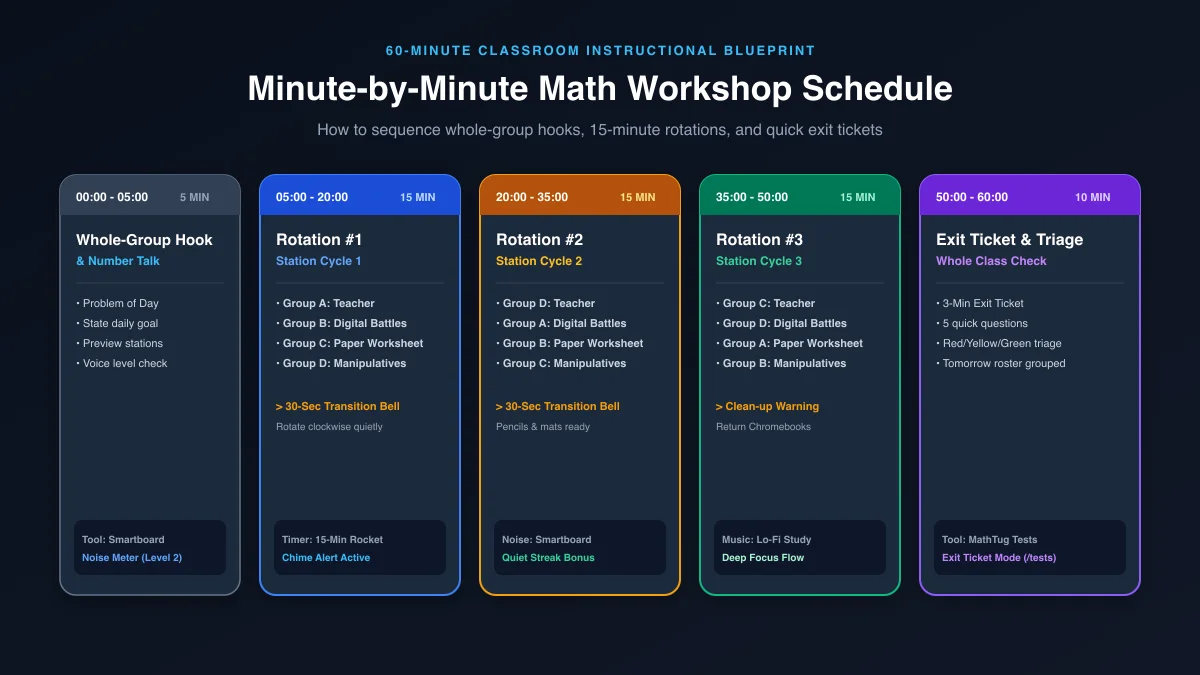
The entire class gathers on the carpet or faces the front board. The teacher introduces a single engaging "Number Talk" or real-world problem of the day. This primes prior knowledge, models mathematical vocabulary, and outlines the target objective of the day without overloading students with lecture slides.
Students disperse to their assigned stations in cohorts of 5 to 7. A prominent Smartboard Visual Timer counts down 15 minutes per cycle. When the chime sounds, students execute a choreographed 30-second rotation clockwise to the next station while the teacher remains seated at the coaching table.
All students return to their home desks. They open Chromebooks or grab a paper slip to complete a rapid 3-Minute Digital Exit Ticket (5 targeted questions). Results immediately triage the classroom into Red (Needs Help), Yellow (Approaching), and Green (Mastered) tiers, automatically grouping tomorrow's small-group intervention cohorts!
Deconstructing the 4 Stations: Roles, Tools & Pedagogical Impact
Station 1: Small-Group Teacher Table (Direct Intervention)
Focus: Targeted Conceptual Understanding & Misconception DiagnosisThis is the instructional heartbeat of your classroom. Instead of speaking to an ocean of faces, you sit face-to-face with just 5 to 7 students at a horseshoe table. Armed with handheld dry-erase boards, each student solves problems while thinking out loud.
- Immediate Feedback: If a student forgets to carry over a ten or divides fractions incorrectly, you pause them immediately—eradicating error patterns before they become ingrained habits.
- Psychological Safety: Introverted students who never raise their hand in whole-group settings willingly ask questions and take intellectual risks in a small cohort.
- Tiered Instruction: For struggling learners, you scaffold with physical ten-frames; for advanced learners, you introduce algebraic extensions and multi-step challenges.
Station 2: Digital Fact Fluency Arena (Chromebook Battles)
Focus: Automaticity, Rapid Fact Recall & Gamified MotivationOld-fashioned flashcards bore students to tears. At Station 2, students pair up on classroom Chromebooks or tablets using the free MathTug 2-Player Split-Screen Arena or Math Tug-of-War.
- Two Students, One Device: Students share a single screen or keyboard, racing to calculate math facts correctly to tug the rope to their side.
- Zero Teacher Grading: The software automatically verifies answers, calculates score deltas, and delivers instant audio and visual celebrations.
- Built-In Anti-Anxiety Options: For neurodiverse students with processing speed hurdles, teachers can launch No-Timer Practice Mode to preserve deep focus without countdown panic.
Station 3: Independent Paper Worksheet Station
Focus: Graphomotor Memory, Spatial Alignment & Deep Procedural FluencyScreen time must be balanced with physical handwriting. Cognitive neuroscience proves that handwriting digits builds positional place value memory in ways typing on a keyboard cannot replicate.
- Custom Printables in 30 Seconds: Use the free MathTug Worksheet Generator to print clean, ad-free practice sheets tailored to today's skill (e.g. 20 questions, regrouping subtraction).
- Zero-Copying Randomized Sheets: Click "Shuffle Numbers 🎲" before printing so students sitting side-by-side have different numerical calculations.
- Self-Checking Station: Place a laminated Teacher Answer Key inside a binder at the table. Students complete five problems, check their work with a green pen, and fix any arithmetic errors independently.
Station 4: Concrete Manipulatives & Tactile Logic
Focus: Kinesthetic Encoding, Peer Math Dialogue & Conceptual PlayMathematics is inherently abstract. Station 4 grounds abstract symbols into tangible physical objects before students commit formulas to memory.
- Physical Tools: Students manipulate fraction circles, Cuisenaire rods, base-ten blocks, and pan balance scales.
- Digital Logic Companion: Pair physical scales with the interactive MathTug Balance Scale Puzzle, where students deduce unknown variables by balancing weights on a virtual beam.
- Math Talk Dialogue: Students explain their mathematical thinking to peers: "Why did you choose that fraction piece? How do you know 2/4 equals 1/2?"
Grouping Strategy: Homogeneous vs. Heterogeneous Cohorts
A major dilemma educators face is how to divide their students into station cohorts. Should groups be stratified by academic ability, or mixed across performance levels? The research-backed answer is: it depends on the station activity!
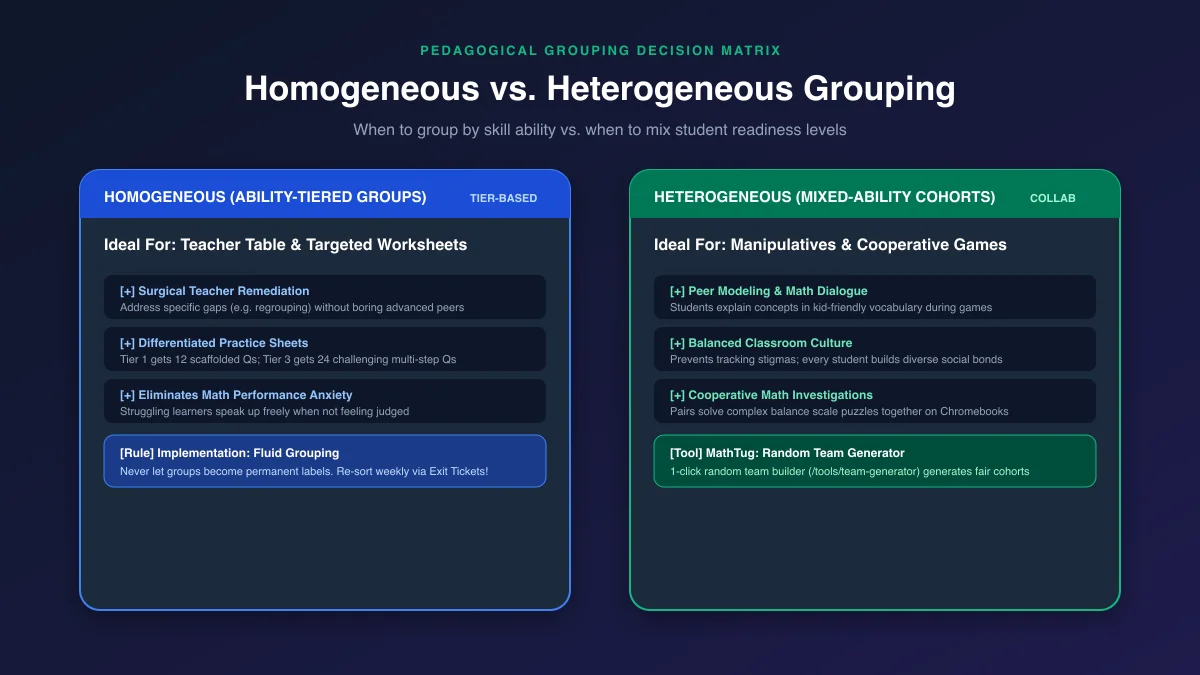
When to Use Homogeneous (Ability-Tiered) Groups:
Homogeneous grouping clusters students of similar readiness levels together (Tier 1: Intensive Intervention, Tier 2: Approaching Grade Level, Tier 3: Proficient, Tier 4: Advanced Extension). This is essential for:
- Targeted Small-Group Remediation: You can teach foundational place-value concepts to Tier 1 without boring Tier 4, and you can challenge Tier 4 with pre-algebra equations without overwhelming Tier 1.
- Differentiated Paper Worksheets: In MathTug Worksheets, print "Easy" (12 scaffolded questions) for Tier 1 and "Hard" (24 multi-step questions) for Tier 4.
- Eliminating Math Insecurity: When struggling learners are surrounded by peers working at the same pace, fear of judgment vanishes, and engagement skyrockets.
When to Use Heterogeneous (Mixed-Ability) Groups:
Heterogeneous grouping mixes high, medium, and developing students into balanced cohorts. This is ideal for:
- Collaborative Manipulatives & Games: High-performing students solidify their conceptual mastery by mentoring peers, while developing learners benefit from hearing mathematical strategies explained in student-friendly vocabulary.
- Equitable Classroom Community: Prevents tracking stigmas, ensuring all students build social and academic relationships across diverse peer groups.
- Automated Group Creation: Teachers can use the free MathTug Random Team Generator to instantly sort 30 students into 4 balanced cohorts with one click, eliminating playground politics.
Automating Classroom Management: Smartboard Central Command
When running stations, the teacher cannot be constantly walking around managing volume or reminding students when to transition. To preserve uninterrupted focus at the teacher coaching table, turn your front Smartboard into a Central Command Dashboard:
-
1. Fullscreen Visual Countdown Timer with Lo-Fi Music
Project the MathTug Classroom Timer in Fullscreen. Select the Rocket Launch or Zen Circle theme with built-in "Lo-Fi Study Beats." The sweeping visual progress ring allows students to glance up from any desk in the room and instantly gauge how many minutes remain, eliminating repetitive "How much time is left?" interruptions.
-
2. Sound-Activated Classroom Noise Meter
In an adjacent browser tab or split window, run the free MathTug Classroom Noise Meter. Set the target threshold to Level 1 (Whisper Mode). If peer chatter at the game or manipulative station exceeds the limit, the Smartboard dynamically warns students with gentle visual feedback and pauses their "Quiet Streak" points without the teacher having to stop their lesson to shush the class.
-
3. The 30-Second Silent Transition Protocol
Train students on the 3-Step Transition Routine when the 15-minute timer alarm sounds:
(1) Freeze & Cap: Immediately put down pencils and cap dry-erase markers.
(2) Stand & Push In: Stand silently and push in your chair.
(3) Rotate Clockwise: Walk in single file to your next station without speaking. Once seated, your 15 minutes begins immediately.
5 Golden Rules to Prevent Station Chaos
Rule 1: "Ask 3 Before Me"
Post a prominent rule: if a student gets stuck at the worksheet or Chromebook station, they must consult three peer group members before approaching the teacher table. This protects your small-group coaching from constant trivial interruptions.
Rule 2: Dry-Erase Pocket Sleeves
Slide your printed MathTug Worksheets into heavy-duty plastic sleeves. Students write answers with dry-erase markers and wipe them clean with felt erasers, allowing 4 consecutive classes to use the exact same paper printouts.
Rule 3: Fast-Finisher Anchors
What happens when a student finishes their worksheet in 7 minutes? Always provide an automated anchor activity: open Chromebooks to the Middle School Tug-of-War or complete a daily logic maze to prevent wandering.
Rule 4: Zero Pencil Sharpening
Pencil sharpeners are the #1 classroom distraction magnet. Ban pencil sharpening during station time. Place a cup of 10 pre-sharpened pencils at each table; if a lead snaps, students swap pencils silently in 2 seconds.
Frequently Asked Questions (FAQ)
What if my math class is only 45 or 50 minutes long instead of 60?
If you teach in a 45-minute block, you have two proven alternatives:
Option A (3 Stations $ imes$ 12 min): Run 3 stations per day (e.g. Teacher Table, Digital Battles, Paper Practice) with a 4-minute hook and 5-minute exit ticket.
Option B (2 Stations per Day): Run 2 stations for 20 minutes each on Monday/Wednesday, and the other 2 stations on Tuesday/Thursday. This gives you deep, unhurried small-group instruction time.
How do I prevent students from just guessing on Chromebook math games?
Pair digital games with scratchwork requirements. In the MathTug 2-Player Battles, require students to jot down their intermediate calculation steps on mini dry-erase boards before pressing their answer buzzer. Peer presence naturally discourages rapid random clicking because their partner is watching the score.
Do I need paid subscriptions or expensive edtech licenses to run this model?
No! Every digital tool required for this blueprint—the Visual Timer, Classroom Noise Meter, Team Generator, Worksheet Generator with Answer Keys, and Exit Ticket Hub—is 100% free with zero logins on MathTug.
Launch Your Blended Math Stations Tomorrow
You don't need a massive classroom overhaul to start. Pick a single upcoming math unit—such as multi-digit multiplication or simplifying fractions. Set up your horseshoe table, open the Smartboard Visual Timer, print a set of custom MathTug worksheets, and watch your students transform into engaged, independent mathematical thinkers.
Want to gamify your Friday review? Check out our guides on Digital Classroom Scoreboards, Smartboard Noise Management, and Zero-Login Classroom Quiz Makers.
Recommended Hands-on Math & Focus Tools
Top-rated learning tools on Amazon that support the strategies in this article:
📥 Get Our Free Classroom Math Puzzles & Worksheets
Enjoyed this guide? Join our educator community and receive weekly printable activities and mental math worksheets.
About the Author: Shubham
Math Educator & Developer
Shubham is a dedicated math educator and software engineer with a passion for gamifying education. He created MathTug to help teachers and parents utilize interactive digital games on smartboards and projectors to make math learning collaborative, active, and stress-free for kids.
Learn more about our educational mission on the About Us page →Enjoyed this post?
Share it with your colleagues or explore more fun ways to teach math on MathTug.
🎮 Play Games