
Best Free Classroom Noise Meters for Smartboards: Keep Students Focused (Without the Gimmicks)
Tired of students shouting just to make physics balls bounce? Discover how K–8 teachers use visual sound level meters with activity presets, quiet streak incentives, and 100% private Smartboard displays.
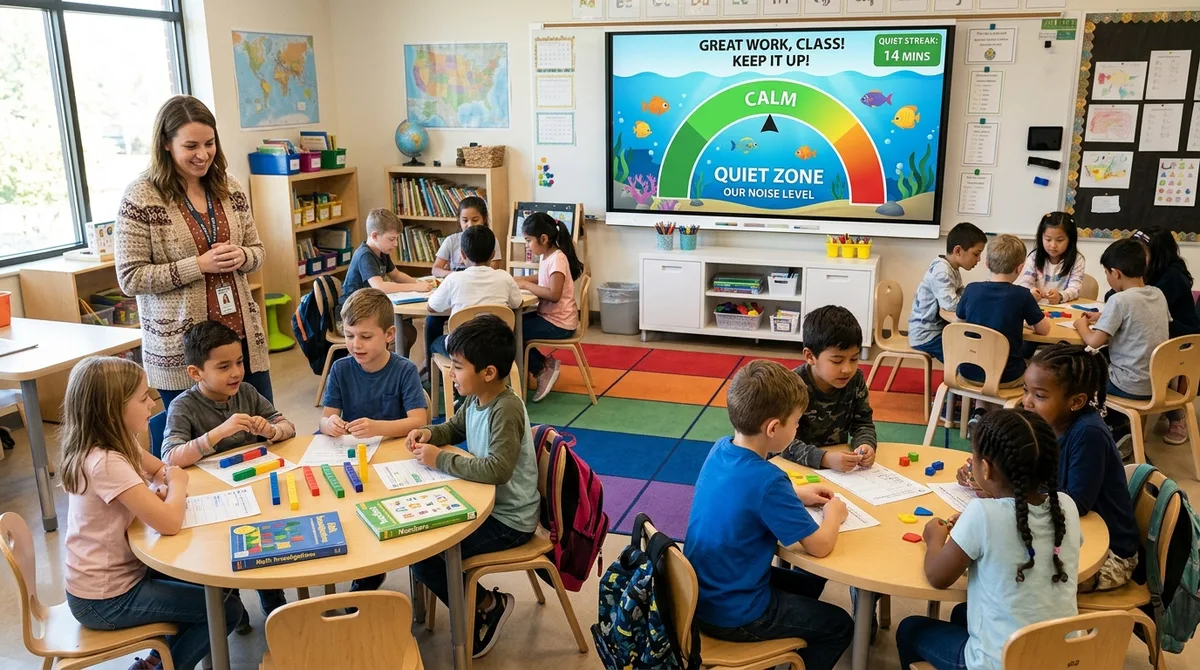
Every teacher knows the physical toll of "The Shush Trap." You begin an independent math station or small-group workshop with quiet intentions. Slowly, ambient chatter escalates from gentle whispers to loud voices, until you find yourself clearing your throat, shouting across the room, or ringing a chime for the tenth time. By 3:00 PM, your vocal cords are exhausted, your patience is frayed, and student focus has dissolved.
Cognitive science explains why volume creep is so detrimental to learning: research published in the Journal of Educational Psychology demonstrates that classroom ambient noise exceeding 65 decibels reduces student working memory capacity and reading/mathematical comprehension by up to 30%. For neurodiverse students and children with ADHD, erratic background chatter makes task persistence almost impossible.
A visual classroom noise meter projected on your front Smartboard transforms auditory policing into student self-regulation. Instead of you acting as the room's noise warden, students can see their volume in real time. But not all noise monitors are created equal.
The "Bouncy Balls Dilemma": Why Gamified Screaming Fails
If you search for classroom sound monitors, Bouncy Balls (bouncyballs.org) is usually the first tool teachers discover. When it launched, it felt revolutionary: balls bounced whenever sound hit the microphone.
However, ask any practicing 3rd, 5th, or 7th grade teacher about their experience, and you will hear a universal complaint: students quickly learn to game the system.
Because the visual feedback rewards louder noises with wilder, more chaotic ball physics, students will deliberately cough loudly, drop textbooks, or shout weird animal noises across the carpet just to see the balls hit the ceiling. Instead of promoting a serene environment, the tool inadvertently incentivizes disruptive volume spikes.
⚠️ The Paradox of Novelty Sound Meters:
If an EdTech tool makes being loud more entertaining than being quiet, it is no longer a classroom management tool — it is an active distraction. Effective noise monitors reward prolonged calm, not volume spikes.
The 4 Classroom Voice Levels: A Shared Language for Volume
Before launching any digital noise meter, teachers must establish explicit acoustic benchmarks. Telling students to "be quiet" is hopelessly subjective. What sounds like a reasonable working volume to an energetic 9-year-old feels deafening to a teacher running a guided reading table.
Adopt this research-backed 4-Tier Classroom Voice Level Matrix:
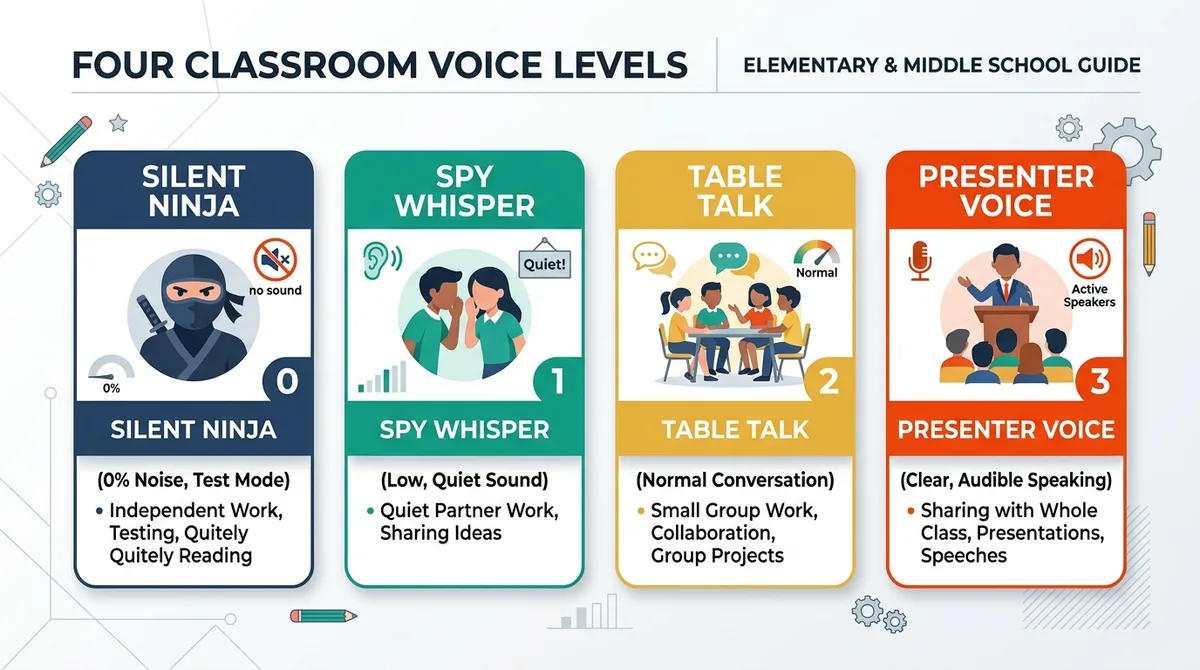
Level 0: Silent Ninja (0% Noise)
When to use: Independent assessments, digital exit tickets, quiet reading, or lockdown drills. Absolute silence; only the sound of pencils and typing is permitted.
Level 1: Spy Whisper (Quiet Collaboration)
When to use: Partner math practice, peer editing, or paired flashcard drills. Only your immediate partner sitting 12 inches away should hear your voice.
Level 2: Table Talk (Small Group Collaboration)
When to use: Math station rotations, science labs, or STEM building challenges. Normal conversational volume audible only to students at your specific 4-person table.
Level 3: Presenter Voice (Whole Class)
When to use: Morning meeting sharing, presenting problem-solving strategies at the Smartboard, or answering whole-group questions.
How the MathTug Classroom Noise Meter Fixes Sound Management
To solve the limitations of existing tools, the MathTug Classroom Noise Meter was built from the ground up with input from veteran elementary and middle school educators:
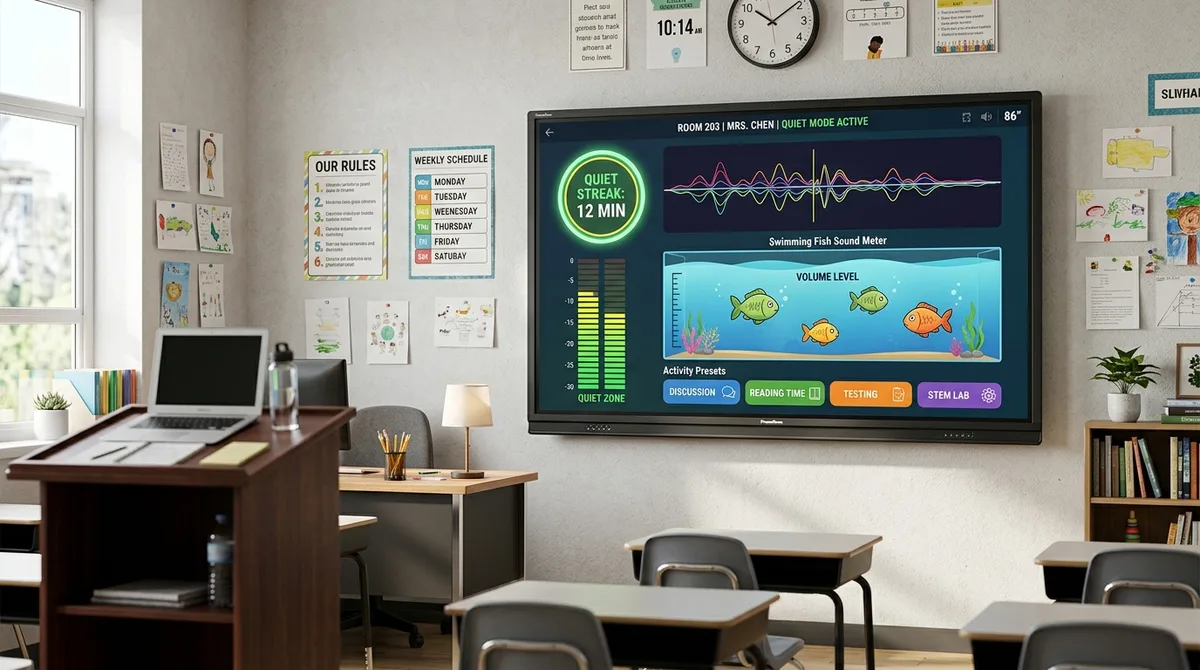
1. Four Calming Themes (No Chaos Physics)
Instead of frantic bouncing that encourages screaming, MathTug provides four sophisticated visualizers tailored to different age groups and classroom temperaments:
- 🐠 Calm Aquarium: Peaceful clownfish, tangs, and neon fish swim gently across an ocean coral bed. When the room stays quiet, more colorful sea life emerges; if the class exceeds the noise threshold, the fish startle and scatter, providing an intuitive, non-punitive visual cue.
- 📊 Studio Soundwave: A sleek LED frequency equalizer with peak-hold decibel bars. Favored by upper elementary, middle, and high school teachers because it looks like professional music studio hardware rather than a childish cartoon.
- 🌌 Cosmic Nebula: Gentle glowing celestial stars that twinkle peacefully during quiet study and flare warmly when ambient noise rises.
- 🫧 Physics Bubbles: Soft floating pastel bubbles for early primary grades with smooth, non-distracting physics.
2. 1-Click Activity Presets (Zero Calibration Headaches)
Different activities require different noise thresholds. With MathTug, you don't have to fiddle with finicky sensitivity numbers every time you switch tasks. Simply click an Activity Preset:
- 🤫 Silent Study (Limit: 30%): Calibrated for testing, independent math worksheets, and silent reading.
- 💬 Quiet Whisper (Limit: 50%): Calibrated for partner math games and peer discussions.
- 👥 Group Stations (Limit: 70%): Calibrated for hands-on center rotations and cooperative table challenges.
- 📢 Whole Class (Limit: 90%): Calibrated for interactive presentations, debates, and classroom competitions.
3. "Quiet Streak" Gamification (Rewarding Calm)
Instead of rewarding loud noises, MathTug flips gamification on its head. The built-in Quiet Streak Timer counts how many uninterrupted minutes your class remains under the threshold. When students hit milestones (5 minutes, 10 minutes, 15 minutes), golden stars and celebratory badges unlock on the screen.
Teachers use these streaks to award whole-class points on the Digital Classroom Scoreboard or earn 5 bonus minutes of Math Tug of War battles on Friday afternoon.
4. 100% Private, Local Audio Processing
In the era of strict student data privacy regulations (COPPA, FERPA, GDPR), school IT administrators scrutinize microphone permissions. MathTug processes all microphone audio 100% locally on your browser hardware via the Web Audio API AnalyserNode. Zero bytes of voice or audio data are recorded, stored, or transmitted over the internet.
Feature Comparison: MathTug vs. Other Classroom Sound Tools
Here is how MathTug stacks up against other popular web-based sound level monitors:
| Feature | MathTug Noise Meter | Bouncy Balls | Classroomscreen | Too Noisy Lite |
|---|---|---|---|---|
| Incentivizes Calm Over Chaos? | ✅ Yes (Quiet Streaks & Stars) | ❌ No (Encourages yelling) | Neutral | Neutral |
| Visual Themes | ✅ 4 (Aquarium, Soundwave, Cosmic, Bubbles) | 4 (Balls, Emojis, Eyes, Bubbles) | 1 (Standard dial) | 1 (Meter gauge) |
| 1-Click Activity Presets | ✅ Silent, Whisper, Group, Class | ❌ Manual slider only | ❌ Manual sensitivity | ❌ Manual threshold |
| Fullscreen Smartboard Mode | ✅ 1-Click Distraction-Free | ✅ Yes | ✅ Full screen widget | Requires app download |
| Banner Ads on Screen? | ❌ ZERO ads in fullscreen | ⚠️ Display ads on page | Paid subscription tier | ⚠️ Ads in free tier |
| Cost | 🎉 100% Free Forever | Free | Freemium ($30+/yr Pro) | Paid App ($4.99) |
A Teacher's 3-Step Routine for Launching the Noise Meter
To ensure students respect the sound monitor from Day 1, follow this 5-minute onboarding protocol:
Step 1: The "Baseline Calibration" Test
Every classroom microphone is unique (a built-in laptop mic behaves differently from a Smartboard ceiling microphone). Before students enter, open the MathTug Noise Meter, select Group Stations, and speak in your normal teaching voice. Adjust the sensitivity slider so your speaking voice hovers right in the comfortable green zone (around 50%–60%).
Step 2: The "Show Me" Practice Drill
Spend 3 minutes explicitly teaching the voice levels. Say: "Class, show me what Level 0 Silent Ninja sounds like." Watch the meter drop to 0% and point out the calm green glow. Then say: "Now show me Level 1 Spy Whisper with your elbow partner." Let students hear what 40% volume feels like.
Step 3: Pair with a Visual Countdown Timer
Volume control is most effective when paired with clear time constraints. Open a split-screen or separate tab with the Classroom Visual Timer set to 15 minutes for your math rotation. Challenge the class: "If we maintain our Quiet Streak until the timer reaches zero, everyone earns a point on our Friday game counter!"
Reclaim Your Classroom Peace Today
You don't need to lose your voice every afternoon to keep your students focused. By replacing subjective shushing with an objective, beautiful visual sound monitor, you empower students to cultivate self-regulation, respect shared working spaces, and achieve deeper academic flow.
🔊 Launch the Free Classroom Noise Meter →
Companion Classroom Guides & Smartboard Utilities:
- Why Visual Timers Reduce Classroom Anxiety: Smartboard Guide
- Fair Classroom Group Maker: Random Team Generator Guide
- Digital Scoreboard for Smartboards: Classroom Gameshow Guide
- The 4-Station Math Blended Learning Blueprint for Elementary Teachers
- Digital Exit Tickets for Math: Complete Formative Assessment Guide
Recommended Hands-on Math & Focus Tools
Top-rated learning tools on Amazon that support the strategies in this article:
📥 Get Our Free Classroom Math Puzzles & Worksheets
Enjoyed this guide? Join our educator community and receive weekly printable activities and mental math worksheets.
About the Author: Shubham
Math Educator & Developer
Shubham is a dedicated math educator and software engineer with a passion for gamifying education. He created MathTug to help teachers and parents utilize interactive digital games on smartboards and projectors to make math learning collaborative, active, and stress-free for kids.
Learn more about our educational mission on the About Us page →Enjoyed this post?
Share it with your colleagues or explore more fun ways to teach math on MathTug.
🎮 Play Games