
Digital Exit Tickets for Math: 7 Ways to Check for Student Understanding Daily (Without Paper Grading)
Say goodbye to stacks of paper exit slips. Discover how K–8 teachers run 3-minute digital math exit tickets with instant zero-login PIN access, live RPM triage dashboards, and automated formative intervention data.

It is 2:42 PM. The dismissal bell rings in eight minutes. You just wrapped up an intensive lesson on adding fractions with unlike denominators. Your students seem engaged, heads are nodding, and hands went up during whole-group guided practice. But as every experienced educator knows: whole-class nodding is often an illusion of collective competence.
How many students actually mastered finding the least common denominator? How many merely copied their desk partner's calculation? And how many are walking home completely lost, destined to struggle through tonight's homework?
For decades, teachers relied on paper exit slips — index cards or half-sheet photocopies hastily filled out and dropped into a cardboard bin. But paper exit slips come with a crushing hidden cost: paper grading fatigue. Sorting, reading, and grading 30 hand-scribbled slips every single afternoon takes 20 to 30 minutes. Across a school year, that is over 75 hours of unpaid evening triage.
The modern solution is digital exit tickets for math. When built with zero student logins and instant automated analytics, digital exit slips allow you to capture definitive formative data in under 180 seconds — without taking a single piece of paper home.
The Science of Formative Triage: Why 3 Minutes Changes Tomorrow's Lesson
Formative assessment is not about putting letter grades in a gradebook; it is about instructional agility. In their landmark educational research synthesis "Inside the Black Box," researchers Paul Black and Dylan Wiliam established that consistent, low-stakes formative checks with immediate instructional adjustment produce some of the largest learning gains ever recorded in educational psychology (effect sizes between 0.40 and 0.70 standard deviations).
When you administer a 3-minute digital exit ticket at the end of class, you aren't evaluating student worth — you are creating tomorrow's roadmap:
- Catch Misconceptions Before They Fossilize: If a student practices an incorrect algorithm for three days on homework, unlearning that misconception takes weeks. A daily exit ticket alerts you to faulty logic within 60 seconds of instruction.
- Eliminate "Teaching to the Middle": Whole-group lectures often bore advanced learners while overwhelming struggling students. Daily exit data tells you exactly who needs extension and who needs intervention.
- Empower Self-Regulated Learners: When students see their instant accuracy score before walking out the door, they take cognitive ownership of their learning status instead of guessing how they performed.
The 3-Tier "RPM" Triage Framework for Math Teachers
The biggest trap with exit slips is spending too much time analyzing the data. Formative data has a shelf life of about 18 hours; if you don't use it tomorrow morning, its instructional value drops to zero.
Top math instructional coaches use the RPM Method to group students within 60 seconds of submission:
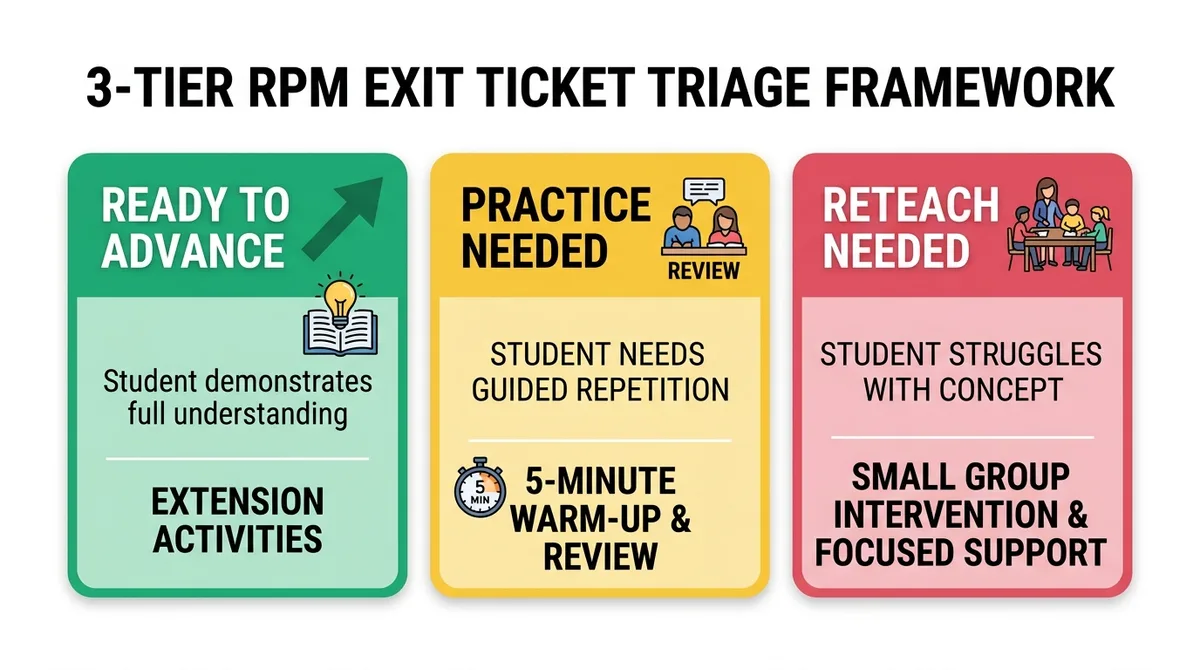
Tier 1: Ready to Advance (80%–100%)
Students demonstrated solid conceptual and procedural mastery of today's learning standard.
Tier 2: Practice Needed (60%–79%)
Students understand the general algorithm but made careless arithmetic slips or basic calculation errors.
Tier 3: Reteach Needed (<60%)
Fundamental conceptual gap. The student lacks the foundational prerequisite schema to execute the skill independently.
7 High-Impact Math Exit Ticket Formats (With Ready-to-Use Prompts)
A good exit ticket should never be a mini-exam. It should feature between 1 and 5 highly diagnostic questions designed to probe specific mathematical reasoning. Here are seven teacher-tested formats you can implement immediately:
1. The 3-Minute Diagnostic Sprint (1-Click MathTug Preset)
When you have zero prep time, open the MathTug Assessment Hub and click the "🎟️ 3-Minute Daily Exit Ticket" button. The system instantly loads five grade-calibrated arithmetic problems and sets a 3-minute timer. Project the QR code on your Smartboard, and your exit check is live in 5 seconds.
2. The "Spot the Flaw" Error Analysis
Instead of asking students to solve a problem from scratch, show them a fictitious student's work containing a classic mathematical misconception:
Problem: Solve 3(x + 4) = 24
Student Work:
Step 1: 3x + 4 = 24
Step 2: 3x = 20
Step 3: x = 20/3
Question: In which step did the student make an algebraic error?
Options: Step 1 (Forgot to distribute 3 to 4) | Step 2 | Step 3 | No error
Correct Answer: Step 1 (Forgot to distribute 3 to 4)
Why it works: Error analysis demands high-order metacognition (Bloom's Taxonomy Level 4). It reveals whether students truly understand algebraic distribution or are merely mimicking steps.
3. The "Would You Rather" Mathematical Dilemma
Challenge students to apply proportional reasoning or mental percentage calculations to real-world scenarios:
Would you rather:
Option A: Receive 25% off a $120 video game
Option B: Receive $35 cash off a $120 video game
Which option saves you MORE money?
Options: Option A (saves $30) | Option B (saves $35) | Both are identical
Correct Answer: Option B (saves $35)
4. Concrete-to-Symbolic Translation
Before students leave, test whether they can translate a real-world story problem into a symbolic equation:
"Marcus has $50. He buys 3 notebooks that each cost 'd' dollars and has $26 left."
Which equation represents this situation?
Options: 3d + 26 = 50 | 50 + 3d = 26 | 3d - 50 = 26 | 26d + 3 = 50
Correct Answer: 3d + 26 = 50
5. The Prerequisite Vocabulary & Geometry Pulse
Often, students fail geometry not because of computation, but because of confusing terminology (e.g., complementary vs. supplementary, radius vs. diameter):
Two angles are complementary. Angle A measures 35°. What is the measure of Angle B?
Options: 55° | 145° | 65° | 90°
Correct Answer: 55° (Complementary angles sum to 90°)
6. Two Approaches to One Calculation
Encourage flexible number sense by testing alternative strategies:
To mentally solve 99 x 7, which mental math shortcut is mathematically correct?
Options: (100 x 7) - 7 | (90 x 7) + 9 | (100 x 7) - 1 | (95 x 7) + 4
Correct Answer: (100 x 7) - 7 (700 - 7 = 693)
7. The "Confidence vs. Accuracy" Calibration
Have students answer one core calculation, followed immediately by an honest reflection: "How confident are you in this answer? (Very Confident / Somewhat Confident / Pure Guess)". When students are highly confident but consistently wrong, it reveals entrenched misconceptions that require immediate 1-on-1 intervention.
How MathTug Automates the Entire Exit Ticket Workflow
Commercial quiz platforms like Kahoot and Google Forms create unnecessary friction during the final 5 minutes of class: students forget passwords, accounts get locked, or teachers have to manually click through spreadsheets. The MathTug Assessment Hub was engineered specifically for rapid end-of-period triage:

- Zero Student Accounts (0 Login): Students never create accounts or input email addresses. They simply enter your 6-letter room PIN (e.g.,
TUG-8421) or scan the Smartboard QR code. - 1-Click Exit Ticket Preset: In the generator tab, click "3-Minute Daily Exit Ticket" to instantly populate five diagnostic questions and pre-configure a 3-minute timer.
- Real-Time Live Dashboard: As students hit submit, their scores populate your screen instantly. You can glance at the overall class pass rate before students even finish packing their backpacks.
- 1-Click CSV Export for Your Gradebook: Need to import the data into PowerSchool, Google Classroom, or Canvas? Click "Export Gradebook (CSV)" on the results screen for an organized spreadsheet of names, scores, and timestamps.
- Printable Paper Fallback: Did your school Wi-Fi drop or did several students forget to charge their Chromebooks? Click "Print Paper Quiz" to generate a clean, photocopy-ready paper sheet with an answer key in two seconds.
Classroom Routine: Running a Seamless 5-Minute Exit Procedure
Here is the exact timeline used by master teachers to transition from lesson to dismissal without chaos:
| Time Remaining | Teacher Action | Student Routine |
|---|---|---|
| 6 Minutes Left | Project MathTug Smartboard QR code on front screen. Turn on the Visual Classroom Timer for 3:00. | Clean desk, open Chromebook, and scan the QR code (or type 6-letter PIN). |
| 5 to 3 Minutes Left | Walk between aisles silently; observe scratch paper working. Monitor room volume with the Classroom Noise Meter. | Complete the 3 to 5 questions independently with zero peer talking. |
| 2 Minutes Left | Glance at the Live Teacher Dashboard. Note students falling into the Red/Yellow RPM tiers. | Submit answers, view personal accuracy feedback, and close Chromebook lid. |
| 1 Minute Left | Give a 30-second shoutout: "85% of our class mastered finding common denominators today! Great focus." | Pack backpacks and stand quietly by desks for dismissal. |
Transform Your End-of-Class Routine Today
Stop drowning in stacks of paper index cards and stop guessing whether your math instruction landed. With zero logins, instant automated scoring, and actionable RPM triage, digital exit tickets give you back your evenings while giving your students the targeted mathematical support they deserve.
🎟️ Launch a 3-Minute Math Exit Ticket Free →
Related Teaching Resources & Articles:
- Free Online Math Quiz Maker for Classrooms: Full Guide
- Differentiated Math Instruction: 3-Tier MTSS Classroom Guide
- 7 Quick 5-Minute Math Bell Ringers for Instant Morning Focus
- The 4-Station Math Blended Learning Blueprint for Elementary Teachers
- Overcoming Math Anxiety with Untimed Games & Formative Checks
Recommended Hands-on Math & Focus Tools
Top-rated learning tools on Amazon that support the strategies in this article:


📥 Get Our Free Classroom Math Puzzles & Worksheets
Enjoyed this guide? Join our educator community and receive weekly printable activities and mental math worksheets.
About the Author: Shubham
Math Educator & Developer
Shubham is a dedicated math educator and software engineer with a passion for gamifying education. He created MathTug to help teachers and parents utilize interactive digital games on smartboards and projectors to make math learning collaborative, active, and stress-free for kids.
Learn more about our educational mission on the About Us page →Enjoyed this post?
Share it with your colleagues or explore more fun ways to teach math on MathTug.
🎮 Play Games