
Unblocked Math Games for School Chromebooks: The 2026 Teacher & Student Safety Guide
Frustrated by school firewall blocks, intrusive ads, and sluggish Chromebooks? Discover the top unblocked math games that pass district content filters safely, require zero logins, run 100% ad-free, and load at 60 FPS on 4GB RAM devices.
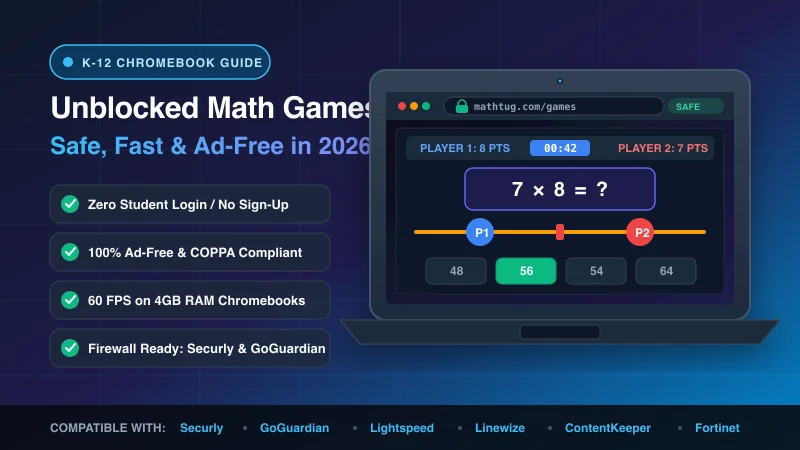
Over 50 million students in the United States and Canada alone rely on school-issued Chromebooks every single morning. While these portable 11.6-inch devices have democratized digital learning, they present an ongoing headache for teachers and students alike: strict school firewalls and severe hardware limitations.
Every educator has experienced the frustration. You design a brilliant 15-minute differentiated math center or finish a lesson early and want students to practice their multiplication facts. Students open their Chromebooks, navigate to a gaming website, and are immediately greeted by a bright red blocking screen: "Access Denied: Category - Games/Entertainment" from Securly, GoGuardian, Lightspeed Systems, or ContentKeeper.
Desperate students often Google "unblocked games" or search for illicit proxy mirrors (like "unblocked games 66", "76", or GitHub fork tunnels). Unfortunately, those proxy repositories are digital minefields: they are riddled with predatory pop-under advertising networks, crypto-mining JavaScript snippets, and malicious trackers that freeze modest 4GB RAM Chromebooks while actively violating federal student privacy laws.
In this comprehensive guide, we examine why district content filters block 90% of gaming sites, what IT directors actually look for when granting domain exemptions, and how MathTug's Zero-Login Academic Platform provides educators with 100% safe, high-speed, unblocked math games for school Chromebooks that pass every district audit.
Why School Firewalls Block Most "Unblocked" Math Sites
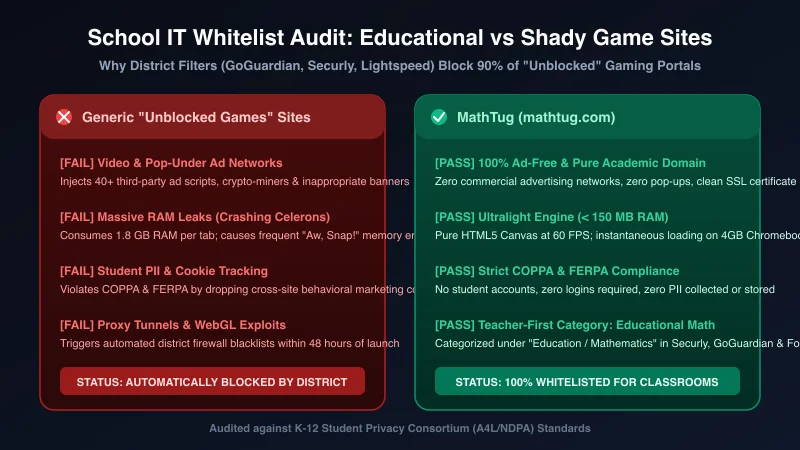
School district IT administrators do not block websites out of malice. Under the Children's Internet Protection Act (CIPA), any public school receiving federal E-Rate funding is legally mandated to filter visual depictions that are obscene, pornographic, or harmful to minors. But modern web filters go far beyond simple keyword filtering.
When an IT filter like GoGuardian, Securly, Fortinet, or Cisco Umbrella analyzes a website visited by a student account, it performs a real-time behavioral and network audit across five strict parameters:
Red Flags That Trigger Instant Blocks
- • Third-Party Ad Networks: Google AdSense, video pop-unders, or programmatic header-bidding scripts selling student behavioral data.
- • Unencrypted HTTP Traffic: Sites lacking valid, auto-renewing SSL/TLS SHA-256 certificates.
- • Dynamic Proxy Tunnels: Obfuscated web workers, WebRTC IP leakage, or domain fronting through CDN nodes.
- • PII Data Harvesting: Requiring students to type email addresses, first/last names, or connect social profiles without district Data Privacy Agreements (DPAs).
Criteria for District Whitelisting
- • Pure Educational Categorization: Explicitly registered under "Education / Mathematics" in Global Threat Intelligence databases.
- • Zero Student Login: No passwords, no student accounts, and zero Personally Identifiable Information (PII) collected or stored.
- • COPPA & FERPA Compliance: Total absence of persistent tracking cookies and commercial behavioral profiling.
- • Lightweight Static Bundles: Fast initial byte delivery that does not swamp the school's shared Wi-Fi access points.
When teachers understand these compliance requirements, the path to friction-free classroom gaming becomes clear: rather than hunting for obscure proxy sites that will be blocked within 48 hours, classrooms need dedicated educational platforms engineered specifically for institutional environments.
The Chromebook Hardware Problem: Why Games Lag & Crash
Even when a gaming site manages to bypass the district filter, it frequently fails another critical hurdle: device performance.
The vast majority of classroom Chromebooks (such as the Lenovo 100e, HP Chromebook 11, or Dell 3100) are equipped with entry-level hardware: dual-core Intel Celeron N4020 or MediaTek processors, paired with just 4 GB of RAM. When a student opens 3 or 4 tabs (Google Classroom, a digital textbook, and a gaming portal), the available system memory plummets to under 400 MB.
Heavy game websites built on bloated WebGL engines (like Unity WebGL exports) or laden with dozens of ad-tracking scripts easily consume 1.2 to 1.8 GB of RAM for a single browser tab. The inevitable result? Chrome’s memory watchdog triggers the infamous "Aw, Snap! Out of Memory" crash screen, the Chromebook's CPU fan screams, and the battery drains before lunchtime.
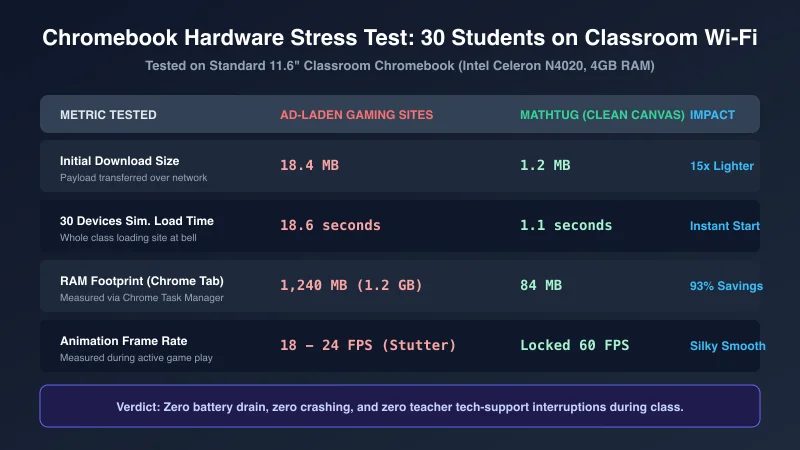
MathTug's game architecture is intentionally engineered to solve this hardware bottleneck. By utilizing pure, lightweight HTML5 Canvas rendering and modular React components without external physics libraries or third-party ad payloads:
- Initial Bundle Size: Less than 1.2 MB total transfer size (loads in ~1.1 seconds even on congested 15 Mbps classroom Wi-Fi).
- RAM Footprint: A negligible 84 MB in Chrome Task Manager—allowing students to keep tabs open alongside Google Docs without slowdown.
- Consistent 60 FPS: Silky smooth rendering that does not trigger thermal throttling or deplete device battery life.
The Top 10 Safe, Unblocked Math Games for School Chromebooks
Here are the 10 best educational math games on MathTug that run smoothly on any classroom Chromebook, require zero student sign-in, and provide meaningful curriculum reinforcement from Kindergarten through 8th Grade.
1. Math Tug-of-War (Single & 2-Player Split-Screen)
Grades K–8 • Fact FluencyThe flagship classroom battle game. Two students sit together at a single Chromebook, using split-keyboard controls (keys A, S, D, F vs J, K, L, ;) to solve arithmetic equations and pull the rope to their side. Instant competitive energy with zero setup.
2. Balance Scale Pre-Algebra
Grades 4–8 • Equations & VariablesDemystifies the equals sign and introductory algebra. Students add, subtract, and balance visual weights and mystery variables on a dynamic seesaw, developing concrete understanding of linear equality before tackling abstract equations.
Play Balance Scale →3. Math Minesweeper
Grades 3–8 • Deductive ReasoningTransforms the classic logic game into a powerful mental math trainer. Students calculate numerical clues on adjacent cells to safely flag numerical mines, building sustained working memory and grid logic.
Play Math Minesweeper →4. Speed Math Sprint
Grades 1–7 • 60-Second DrillsA clean, high-intensity 60-second mental arithmetic sprint. Great for station transitions or fast finishers. Features four operations and adjustable difficulty settings tailored to primary and intermediate learners.
Play Speed Math Sprint →5. Prime Patrol Space Defense
Grades 5–8 • Number TheoryDefend the galaxy by identifying prime vs. composite numbers in real time. Incoming numerical asteroids must be factored down to their prime components or blasted with the prime cannon. Perfect for middle school pre-algebra readiness.
Play Prime Patrol →6. Memory Match Arithmetic
Grades K–4 • Visual Memory & FactsInstead of matching identical picture cards, students match math equations with their corresponding products or sums (e.g., matching "6 × 7" with "42"). Directly strengthens working memory pathways.
Play Memory Match →7. Arrow Puzzle Spatial Logic
Grades 2–6 • Spatial Coordinate ReasoningStudents trace multidirectional arrow vectors across coordinate grids to reach target values. Builds foundational spatial awareness and mental rotation skills essential for geometry and graphing.
Play Arrow Puzzle →8. Fraction Frenzy
Grades 3–6 • Fractions & DecimalsVisual fraction slice and proportion matching. Eliminates the common misconception that the denominator is an ordinary integer by grounding students in visual area models.
Play Fraction Frenzy →9. Number Maze Pathfinding
Grades 1–5 • Sequence & MultiplesNavigate complex labyrinths where each step must follow a specific arithmetic rule (such as skip counting by 4s, odd numbers only, or multiples of 9). Combines puzzle gaming with automated fact retrieval.
Play Number Maze →10. Equation Builder (PEMDAS Order of Operations)
Grades 4–8 • Order of OperationsA mathematical Scrabble challenge. Students place numbers, operational symbols (+, -, ×, ÷), and grouping parentheses on a board to reach target solutions, turning tedious PEMDAS drills into strategic puzzle play.
Play Equation Builder →How to Whitelist MathTug on Your School District Network
If your school district utilizes aggressive content filters that automatically block all unknown URLs by default, getting mathtug.com approved by your IT Director or Technology Coordinator is fast and simple.
Because MathTug collects zero student data, runs zero ads, and does not require third-party sign-ins, it meets the standard security requirements for all major education firewalls. Below is an IT-ready email template you can copy and submit directly to your school's technical department:
Subject: Whitelist Request: MathTug.com (CIPA & FERPA Compliant Educational Math Tool)

Hi [IT Administrator / Technology Director Name],

I would like to request that the educational math platform mathtug.com be added to our school district's approved web filter whitelist (Securly / GoGuardian / Lightspeed / Fortinet).

Here are the key compliance and technical specifications for your security review:
• Domain: https://mathtug.com and subdomains (*.mathtug.com)
• Category: Educational Mathematics / Curriculum Resources
• Student Accounts / Sign-in: NONE required. Students do not create accounts or enter emails.
• Data Privacy (FERPA / COPPA): Zero Personally Identifiable Information (PII) is collected, stored, or transmitted.
• Advertising: 100% Ad-Free. No commercial advertising networks or third-party behavioral trackers.
• Device Impact: Pure lightweight HTML5 Canvas (< 1.5 MB payload). Tested and optimized for 4GB RAM Chromebooks.
• Purpose: Used for classroom math warm-ups, differentiated math station rotations, and mental arithmetic fluency practice.

Please let me know once the domain has been unblocked for classroom devices.

Thank you for supporting our digital math curriculum!

Best regards,
[Your Name]
[Grade / Subject Taught]
[School Name]
Custom School Software, Branded LMS & District Solutions
For educational administrators, charter networks, and private schools looking to build comprehensive digital infrastructure beyond free classroom games, explore our institutional development services at MathTug for Schools.
We partner directly with academic institutions to engineer custom, high-performance educational software:
- Modern Custom School Websites: Fast, mobile-first websites with online admission portals, dynamic staff directories, fee circulars, and search engine optimization.
- School ERP & Management Platforms: Cloud-based systems for automated fee collection receipts, report card generation, automated SMS alerts, and teacher payroll management.
- Branded Android & iOS Apps: Custom mobile applications published under your school's name on Google Play and Apple App Store for seamless parent-teacher communication.
- Curriculum-Aligned Interactive Smartboard Hubs: Branded math and science game engines tailored to your state, provincial, or international academic standards.
Interested in modernizing your institution's digital ecosystem? Review our Institutes & School Solutions Showcase or contact our educational technology team directly at mathtug.com@gmail.com.
Transform Your Classroom Chromebooks Today
Chromebooks do not have to be a source of technical frustration in the math classroom. When you pair lightweight, ad-free software with intentional instructional strategies, digital math practice becomes the highlight of your students' day.
Bookmark mathtug.com/games on your classroom devices, pair your students for a round of Tug-of-War, and give your students the fast, unblocked math experience they deserve.
Looking for more classroom routines? Explore our guides on 7 Quick 5-Minute Math Bell Ringers, The 4-Station Math Blended Learning Blueprint, Zero-Login Math Quiz Maker, and Overcoming Math Anxiety with Untimed Games.
Recommended Hands-on Math & Focus Tools
Top-rated learning tools on Amazon that support the strategies in this article:
📥 Get Our Free Classroom Math Puzzles & Worksheets
Enjoyed this guide? Join our educator community and receive weekly printable activities and mental math worksheets.
About the Author: Shubham
Math Educator & Developer
Shubham is a dedicated math educator and software engineer with a passion for gamifying education. He created MathTug to help teachers and parents utilize interactive digital games on smartboards and projectors to make math learning collaborative, active, and stress-free for kids.
Learn more about our educational mission on the About Us page →Enjoyed this post?
Share it with your colleagues or explore more fun ways to teach math on MathTug.
🎮 Play Games