
5 Best Free Classroom Noise Meters for Smartboards in 2026 (Bouncy Balls Alternatives)
The 5 best FREE classroom noise meters for smartboards — no login, COPPA-safe, and actually work. Plus: how to stop students from gaming the bouncy balls.
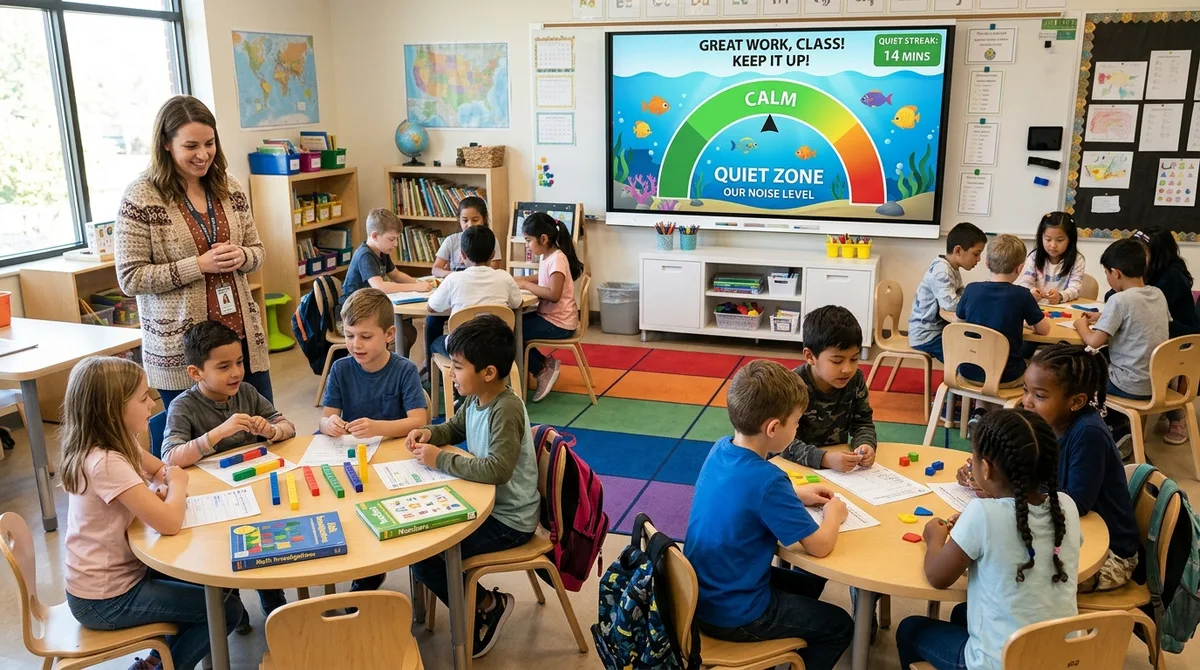
"Twenty-five third graders just discovered that screaming makes the balls bounce higher..." It is an infamous rite of passage for almost every educator who has ever projected a sound monitor onto a classroom smartboard. You load a digital noise tool with the best of intentions, hoping to nurture a calm, focused environment for independent math centers. Within ninety seconds, an observant eight-year-old drops a metal ruler onto the floor. On screen, thirty brightly colored physics balls rocket violently toward the ceiling. A classmate nearby tests the waters with an exaggerated stage-cough; the balls ricochet even higher. Before you can dash across the room to mute your laptop microphone, half the class is screeching like baby pterodactyls just to see how high the physics engine can launch the spheres.
Instead of cultivating a serene learning sanctuary, you have inadvertently sponsored a high-decibel screaming tournament. Yet passive acoustic control is vital for student success: landmark cognitive studies published in the Journal of Educational Psychology reveal that ambient classroom noise exceeding 65 decibels reduces student working memory capacity and mathematical comprehension by up to 30%. For neurodivergent children and students with ADHD, erratic background chatter makes sustained focus nearly impossible. When implemented with the right tool, a free classroom noise meter for smartboards gives students an objective visual mirror for their volume—saving your vocal cords and teaching lifelong self-regulation. Below, we break down the 5 best free classroom noise meters for smartboards in 2026, vetted by educators for data privacy, zero login requirements, and anti-gaming mechanics.
The Real Problem With Most Classroom Noise Meters
While the concept of a visual sound meter is brilliant, most legacy classroom noise tools suffer from three fatal design flaws that undermine teacher authority:
- The "Meter Arms Race" (Rewarding Chaos): The fundamental paradox of novelty sound meters is that chaotic noise produces the most entertaining animations. When an EdTech tool makes screaming more visually thrilling than silence, it ceases to be a classroom management utility and becomes an active classroom disruption. Students will systematically game the microphone whenever your back is turned.
- Rapid Novelty Wear-Off: Basic needle gauges or static decibel dials might command attention for the first two days of school. By Thursday, students tune them out completely. Without meaningful behavioral incentives or visual variety, static meters fade into the background visual clutter of your classroom.
- Microphone Calibration Nightmares: Classrooms are acoustically complex spaces. Rattling projector fans, air conditioning vents, passing hallway traffic, and the hum of fluorescent lighting often register as false volume spikes. If a noise meter lacks easy sensitivity presets, teachers spend half their instructional period tweaking sliders rather than teaching students.
What to Actually Look for in a Noise Meter
To avoid gimmicks that backfire, evaluate any classroom noise monitor against these five teacher-tested criteria before projecting it on your smartboard:
- Zero Login and Instant Browser Launch: Instructional transitions must be frictionless. Your noise monitor must open in a single click in any browser without requiring teacher credentials, student account set-ups, or software downloads.
- COPPA & FERPA Privacy Compliance (Zero Audio Recording): School district microphones must never stream classroom audio to external cloud servers. An effective noise meter must process sound levels 100% locally on your device via the browser's Web Audio API, ensuring zero voice data or acoustic snippets are ever saved or transmitted over the internet.
- Smartboard-Optimized High-Contrast Visibility: The display must be clearly readable from the furthest desk in the back corner of your room, even under bright overhead lighting. Color shifts (green for calm, yellow for caution, red for limit breached) should be intuitive and unmistakable.
- Multiple Calming Visual Themes: Different age groups and classroom temperaments require different aesthetics. Having calming options—such as swimming ocean fish, twinkling galaxies, gentle pastel bubbles, or sleek audio soundwaves—prevents visual fatigue and avoids over-stimulating students.
- Incentive Integration (Rewarding Calm Over Chaos): The best sound monitors flip the psychological script: they reward prolonged quiet rather than merely reacting when someone makes noise. Features like a "Quiet Streak" counter gamify calm, celebrating focus milestones with unlockable badges and stars.
Quick Comparison: 5 Best Free Noise Meters
Here is an at-a-glance comparison of the five leading free classroom sound meters available for smartboards, interactive whiteboards, and projectors:
| Tool | Cost | Login | Privacy | Smartboard Ready | Best Feature |
|---|---|---|---|---|---|
| MathTug Noise Meter | 100% Free | No | 100% Local (Private) | ✅ Touch & Fullscreen | Calming Bouncy Themes & Quiet Streak Rewards |
| Bouncy Balls | Free | No | 100% Local (Private) | ✅ Fullscreen | The original physics bouncing spheres |
| Classroomscreen | Free / Paid Pro | No (Basic) | 100% Local (Private) | ✅ Multi-Widget | All-in-one timer, sound meter & clock board |
| Decibel Shield | Free | No | 100% Local (Private) | ✅ Web-Based | No-nonsense traffic light & decibel gauge |
| KiwiBee (Zero Noise) | Free | No | 100% Local (Private) | ✅ Web-Based | Playful animated animal gamification |
1. MathTug Classroom Noise Meter — The Modern Gold Standard
The MathTug Classroom Noise Meter was engineered specifically by practicing educators to eliminate the flaws of older legacy tools. It replaces chaotic physics bouncing with four peaceful, high-contrast visualizers: Calm Aquarium (where colorful fish swim peacefully and scatter gently if noise peaks), Cosmic Nebula, Physics Bubbles, and a sleek Studio Soundwave designed for older students. It features 1-click Activity Presets (Silent Study, Quiet Whisper, Group Stations, and Whole Class) that eliminate sensitivity fiddling, alongside an innovative Quiet Streak Counter that rewards classes with stars for every uninterrupted minute of focused calm.
- Pros:
- 100% free with zero ads in fullscreen smartboard mode.
- Incentivizes calm rather than chaos via the Quiet Streak milestone system.
- 1-click Activity Presets calibrate sensitivity instantly for tests, pair work, or STEM labs.
- Strictly 100% local browser processing—zero microphone audio is ever saved or transmitted.
- Cons:
- Requires one-time browser permission to access the local microphone upon launch.
👉 Launch the Free MathTug Noise Meter →
2. Bouncy Balls (bouncyballs.org) — The Nostalgic Pioneer
Bouncy Balls is the original tool that introduced millions of teachers to visual sound monitoring. Whenever the microphone picks up classroom noise, colorful 2D physics spheres, floating emojis, eyeballs, or soap bubbles bounce erratically across the screen. While visually memorable and completely free to open, its physics engine frequently becomes a playground for students trying to trigger dramatic visual explosions by clapping or shouting.
- Pros:
- Instantly accessible with zero account creation or setup.
- Four fun visual themes (Plastic Balls, Emojis, Eyeballs, and Bubbles).
- Built-in microphone sensitivity slider and optional alert chimes.
- Cons:
- Actively rewards high volume with exciting, violent visual bounce animations.
- Displays web banner advertisements along desktop screen margins.
- Lacks dedicated activity presets, requiring manual recalibration between tasks.
3. Classroomscreen Noise Meter — The Multi-Tool Dashboard
Classroomscreen is a beloved virtual desktop workspace where teachers can arrange multiple classroom management widgets on a single projected screen. Alongside countdown timers, text boxes, and name pickers, it offers a clean sound level widget. The widget features a classic mechanical dial gauge with color-coded green, orange, and red zones, accompanied by an optional warning chime when the threshold is crossed.
- Pros:
- Allows the noise meter to sit alongside a countdown timer and instructions on a single screen.
- Clean, professional aesthetic suitable for middle and high school classrooms.
- Customizable bell alerts to gently remind students when volume exceeds limits.
- Cons:
- The meter needle can be small and difficult to read from the back row unless made full screen.
- Saving customized screen layouts and accessing premium widgets requires a paid Pro subscription ($30+/year).
4. Decibel Shield — The Minimalist Traffic Light
For upper elementary, middle school, and high school teachers who find cartoon animals and bouncing spheres distracting, Decibel Shield offers an austere, high-visibility solution. It presents a prominent digital decibel readout alongside an unmistakable three-stage traffic light (Green = Acceptable, Yellow = Warning, Red = Violation). Its stripped-back design makes it especially effective during silent testing sessions.
- Pros:
- Mature, non-infantilizing aesthetic that older students take seriously.
- Unmistakable color transitions visible under any classroom lighting conditions.
- Zero visual clutter to distract students during independent assessments.
- Cons:
- Lacks gamified reward mechanics to intrinsically motivate younger learners.
- No alternative visual themes or creative animations.
5. KiwiBee (Zero Noise Classroom) — The Early Childhood Favorite
KiwiBee is a charming, story-based noise monitor tailored specifically for preschool, kindergarten, and first-grade classrooms. It features cute animated animals that enjoy peaceful outdoor scenes. When room volume escalates beyond safe listening thresholds, the animals cover their ears or retreat into hiding, offering early learners an intuitive, empathy-driven visual cue to lower their speaking volume.
- Pros:
- Highly effective empathy-based feedback for children ages 4 through 7.
- Gentle visual and auditory notifications that avoid startling sensitive students.
- Simple web-based access requiring no complex technical knowledge.
- Cons:
- Too juvenile for students in third grade and above.
- Fewer sensitivity adjustment options for diverse room acoustic profiles.
How to Stop Students From Gaming the Noise Meter
Even the finest noise meter will fail if students treat it as a game to break. Veteran teachers rely on these five psychological strategies to eliminate gaming from day one:
- Conduct the "Controlled Scream" on Day One: The moment you first introduce a noise monitor, student curiosity is at its peak. Feed that curiosity in a controlled manner! Tell the class: "We are going to do a 5-second science test. On the count of three, everyone make as much noise as possible to see the meter hit 100%!" Once students witness the maximum warning animation in an authorized moment, the mystery is gone, and you can transition to serious academic norms.
- Flip the Incentive: Celebrate "Quiet Streaks" Instead of Violations: Human brains respond far more powerfully to positive reinforcement than punitive alerts. Use a tool with an integrated Quiet Streak timer (like the MathTug Noise Meter). Challenge your room: "If we maintain our Quiet Streak for 12 uninterrupted minutes during math workshop, our entire class earns 5 bonus minutes of Friday Math Tug of War battles!"
- Establish Clear Acoustic Benchmarks (The 4 Classroom Voice Levels): Never tell students to vaguely "be quiet." Explicitly teach the 4 Voice Levels: Level 0 (Silent Ninja for tests), Level 1 (Spy Whisper for partner math drills), Level 2 (Table Talk for station rotations), and Level 3 (Presenter Voice for whole-group sharing). Before starting any activity, point to the smartboard and announce the target level.
- Position Your Microphone Away From Mechanical Noise Sources: Projector cooling fans, air conditioning blowers, and pencil sharpeners emit constant low-frequency vibrations that trick microphones into registering volume spikes. Place your laptop or external microphone near student work tables and test the ambient baseline reading before students enter the room.
- Institute the "Two-Strike Tampering Rule": If an individual student deliberately slams a textbook, bangs their desk, or coughs into the microphone to trigger a false alarm, enforce a calm, non-dramatic consequence: the quiet streak resets to zero, and the class forfeits one minute of free choice. Peer accountability quickly stops intentional disruption in its tracks.
Calibrating Your Noise Meter for Different Activities
One size never fits all when managing classroom acoustics. Use these guideline settings to calibrate your noise meter for different daily learning structures:
1. Silent Independent Work (Tests & Independent Reading)
Recommended Threshold: 25% – 30%
During unit math tests or silent journaling, the room should be near-silent. At this sensitivity, turning notebook pages and typing on Chromebook keyboards remain comfortably in the green zone, while whispered talking immediately trips the warning yellow glow.
2. Paired Partner Practice (Math Games & Peer Editing)
Recommended Threshold: 45% – 55%
When students sit knee-to-knee playing games like Math Tug of War or reviewing math facts, gentle whispering is expected. This threshold accommodates two students speaking quietly 12 inches apart while catching any voice that projects across table clusters.
3. Collaborative Group Stations & STEM Labs
Recommended Threshold: 65% – 75%
Hands-on science investigations and manipulatives-based math rotations naturally generate movement, laughter, and enthusiastic problem-solving. This setting gives students room for healthy academic collaboration while preventing the room from devolving into outdoor recess volume.
Frequently Asked Questions
Does an online classroom noise meter record student voices or audio?
No. Trusted educational noise monitors—including the MathTug Noise Meter—process all audio strictly locally on your computer hardware using the browser's Web Audio API. The microphone signal is instantly converted into mathematical decibel amplitude values. Zero audio files, voice snippets, or conversations are ever recorded, saved to disk, or transmitted across the internet, making these tools 100% COPPA and FERPA compliant.
What is the best free alternative to Bouncy Balls for smartboards?
The MathTug Classroom Noise Meter is widely recognized as the top modern alternative to Bouncy Balls. It replaces chaotic bouncing physics that encourage student screaming with four calming visualizers (Calm Aquarium, Cosmic Nebula, Studio Soundwave, and Physics Bubbles), provides 1-click activity presets, and includes a Quiet Streak counter to actively reward sustained focus.
Do classroom noise meters work on Chromebooks and iPads?
Yes. Any device equipped with a working microphone and a standard modern web browser (Google Chrome, Safari, Microsoft Edge, or Firefox) can run these web tools. You can launch the noise meter on a teacher laptop or Chromebook and project it to your smartboard or interactive whiteboard using an HDMI cable, Apple AirPlay, or Google Cast.
How do I stop false alarms caused by background classroom noise?
Perform a quick 10-second baseline calibration before students arrive. Observe the resting ambient decibel level of your empty room (accounting for HVAC fans and projector hum) and set your noise meter's baseline sensitivity so that ambient room noise registers well below 15% to 20% on the visual scale.
🔇 Ready to Restore Calm to Your Classroom?
Try the 100% free, private classroom noise meter built for smartboards. No login, zero ads in fullscreen, and designed by teachers to stop students from gaming the microphone.
▶ Launch Free Classroom Noise Meter Now →Recommended Hands-on Math & Focus Tools
Top-rated learning tools on Amazon that support the strategies in this article:
📥 Get Our Free Classroom Math Puzzles & Worksheets
Enjoyed this guide? Join our educator community and receive weekly printable activities and mental math worksheets.
About the Author: Shubham
Math Educator & Developer
Shubham is a dedicated math educator and software engineer with a passion for gamifying education. He created MathTug to help teachers and parents utilize interactive digital games on smartboards and projectors to make math learning collaborative, active, and stress-free for kids.
Learn more about our educational mission on the About Us page →Enjoyed this post?
Share it with your colleagues or explore more fun ways to teach math on MathTug.
🎮 Play Games