5 Free Smartboard Tools Every Elementary Teacher Needs in 2026 (No Login Required)
Save prep time and keep your classroom engaged! Here are 5 free, interactive smartboard tools that run directly on your projector without passwords, subscriptions, or intrusive ads.
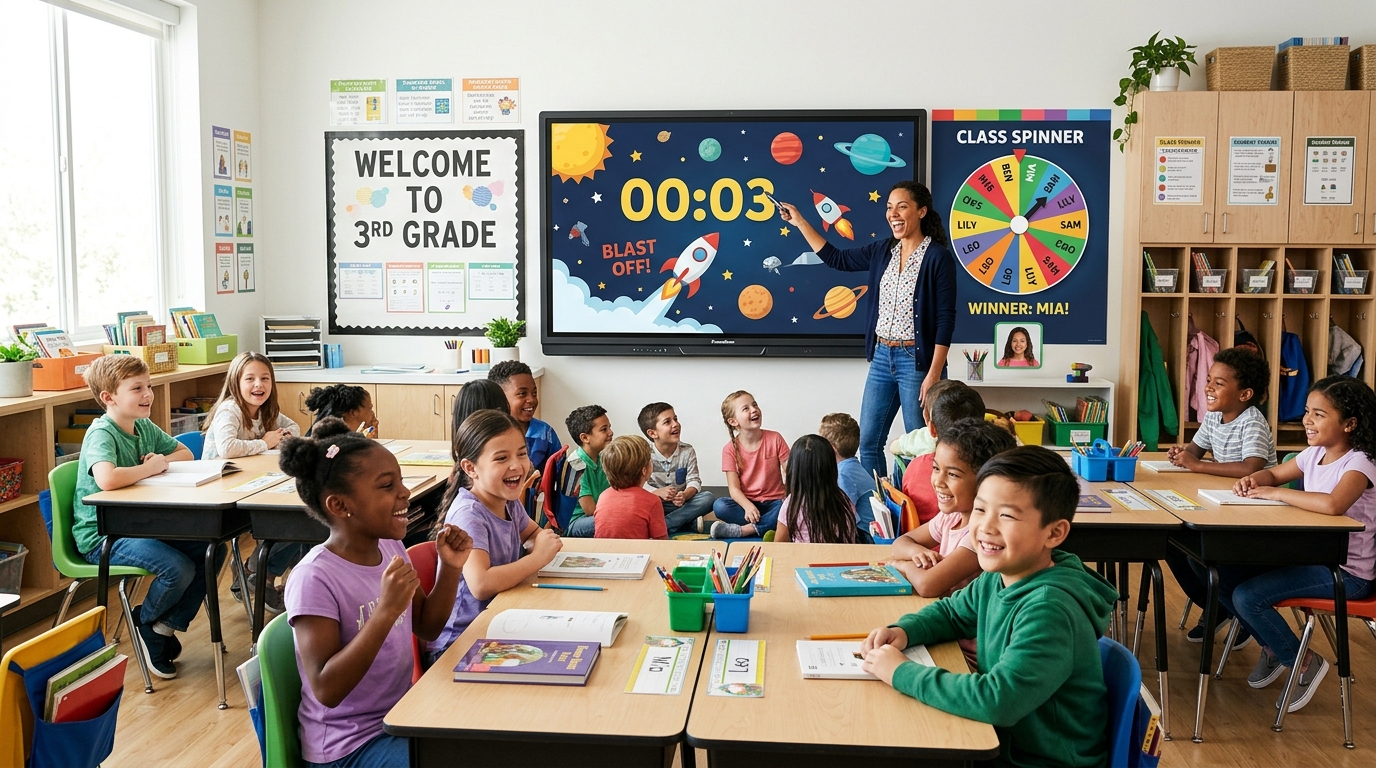
Every elementary teacher knows the pain: your lesson plan is ready, students are seated, you pull up an interactive whiteboard activity, and boom — “Your 14-day free trial has expired” or “Please enter your school district Google SSO password.”
When you have 25 energetic seven-year-olds staring at the screen, every 30 seconds lost to a login screen invites chaos. You need reliable, friction-free utilities that launch in one click on your Promethean Board, SMART Board, or projector.
Here are the 5 best free smartboard tools that require zero login, zero software installation, and zero subscriptions — designed specifically for daily elementary classroom management and engagement.
1. Visual Classroom Timer (Rocket Launch, Melting Candle & Bomb Fuse)
- Best for: Timed math drills, reading rotations, clean-up transitions, and quiet study blocks
- Key Feature: Visual countdown animations designed for younger students who cannot yet read digital clocks
- Access: 👉 Open Free Visual Classroom Timer →
Traditional digital clocks often cause anxiety or mean nothing to Kindergarten and 1st graders who are still learning time. The MathTug Visual Classroom Timer solves this by combining giant high-contrast digital numbers with four animated visual modes:
- 🚀 Rocket Launch: A cartoon rocket counts down on the launchpad. At 0:00, thrusters ignite and the rocket blasts into space with an optional celebratory school bell chime!
- 🕯️ Melting Candle: A glowing candle slowly melts down as work time elapses. Perfect for calm reading periods.
- 💣 Bomb Fuse: A glowing spark travels down a curling fuse, finishing with a fun, non-scary confetti burst when time is up.
- 🧘 Zen Circle: A serene circular progress ring for silent testing and independent seatwork.
Teacher Tip: Click the Fullscreen icon in the top right corner to turn your entire classroom projector wall into a giant countdown display visible from the back of the room.
2. Random Student Name Picker Wheel (Auto-Saves Roster)
- Best for: Fair classroom questioning, reading turns, group leaders, and mystery rewards
- Key Feature: Remembers your class roster on your device so you never have to re-type names
- Access: 👉 Open Random Name Picker Wheel →
Calling on the same three eager hands in the front row is a constant trap. The Random Name Picker Wheel brings game-show excitement to daily participation.
Unlike other cluttered wheel tools covered in spammy popups, this wheel features smooth physics deceleration, realistic tick sounds, and a celebratory confetti modal when a student is chosen. Crucially, the “Remove Winner” toggle lets you take the picked student off the wheel for the rest of the lesson, ensuring every child gets an equal opportunity to participate.
Teacher Tip: Paste your roster once on Monday morning. The tool automatically saves it in your browser’s local storage, so your class is waiting for you all week.
3. Visual Classroom Noise Meter (Bouncing Physics Balls)
- Best for: Managing noise levels during group work, STEM stations, and independent reading
- Key Feature: 100% private in-browser audio analysis — zero recordings or cloud storage (COPPA compliant)
- Access: 👉 Open Classroom Noise Meter →
Telling your class “Be quiet, please” twenty times during science stations is exhausting. The Bouncing Balls Classroom Noise Meter gives students an immediate, visual feedback loop.
Using your computer or smartboard microphone, dozens of colorful physics balls bounce higher on the screen as the classroom gets louder. If noise enters the red zone, the screen gently flashes: “SHHH! TOO LOUD! 🤫” with an optional gentle chime. Kids naturally self-monitor their voices just to keep the balls resting peacefully on the floor.
4. Math Tug of War (Classroom Smartboard Competition)
- Best for: Whole-class math warm-ups, Friday team battles, and fact fluency review
- Skills Covered: Addition, subtraction, multiplication tables, division, and fractions
- Access: 👉 Launch Classroom Math Battle →
Nothing gets an elementary classroom louder or more motivated than a team battle. In Math Tug of War, you divide your classroom into Team Red and Team Blue. Each team sends a representative to the board (or students collaborate in tables) to solve mental math problems.
Each correct answer pulls the interactive rope toward their side. It works seamlessly on interactive whiteboards with large touch targets and instant feedback.
5. Arrow Puzzle (Spatial Reasoning & Fast-Finisher Brain Break)
- Best for: Morning warm-up challenges, logic station centers, and fast finishers
- Skills Covered: Spatial awareness, directionality, and sequencing logic
- Access: 👉 Play Arrow Puzzle →
When students finish their seatwork early, you need an activity that stimulates their brain without turning into mindless arcade clicking. Arrow Puzzle is an elegant spatial logic grid where students must tap arrows in the correct sequence so each arrow can fly off the board without colliding.
It acts like a cross between Sudoku and a maze, training students in algorithmic thinking and perseverance.
Weekly Classroom Routine Template (How to Combine These Tools)
Here is how experienced teachers integrate these free tools into their weekly schedules:
| Time / Routine | Smartboard Tool | Classroom Goal |
|---|---|---|
| Morning Arrival (8:30–8:45 AM) | Rocket Launch Timer (15 Min) | Visual prompt for unpacking, morning journals, and attendance. |
| Math Warm-Up (9:00–9:15 AM) | Classroom Math Tug of War | High-energy team battle to review multiplication facts. |
| Reading Centers (10:00–10:45 AM) | Bouncing Balls Noise Meter | Maintains quiet whisper volumes while teacher runs small reading groups. |
| Science & Social Studies (1:15 PM) | Name Picker Wheel | Fair selection for student helpers, reading aloud, and lab leaders. |
| Pack-Up Transition (2:45 PM) | Bomb Fuse Timer (5 Min) | Exciting race against the clock to clean desks and pack backpacks. |
Frequently Asked Questions
Do these tools require a student roster upload or Google login?
No. You do not need to create an account, enter email addresses, or connect your school Google account. Everything runs anonymously in the browser, protecting student privacy.
Can students use these tools on 1:1 Chromebooks?
Yes! While designed with large touch buttons for Smartboards, all tools are fully responsive and work on student Chromebooks, iPads, and Windows laptops.
Recommended Hands-on Math & Focus Tools
Top-rated learning tools on Amazon that support the strategies in this article:
📥 Get Our Free Classroom Math Puzzles & Worksheets
Enjoyed this guide? Join our educator community and receive weekly printable activities and mental math worksheets.
About the Author: Shubham
Math Educator & Developer
Shubham is a dedicated math educator and software engineer with a passion for gamifying education. He created MathTug to help teachers and parents utilize interactive digital games on smartboards and projectors to make math learning collaborative, active, and stress-free for kids.
Learn more about our educational mission on the About Us page →Enjoyed this post?
Share it with your colleagues or explore more fun ways to teach math on MathTug.
🎮 Play Games