
Split-Screen Math Battles: The Science of 2-Player Same-Device Learning in K–8
Tired of students silently staring into isolated Chromebook screens? Learn how 2-player split-screen math games on a single device ignite peer scaffolding, boost fact recall by 36%, and turn arithmetic drills into electrifying classroom duels.
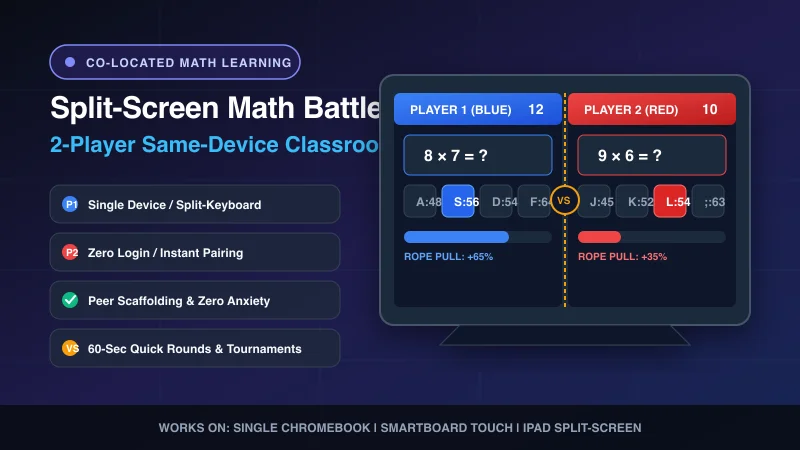
Walk into any modern elementary or middle school classroom during independent math time, and you will witness an eerie, ubiquitous scene: thirty children sitting in complete silence, hunched over individual Chromebook screens with headphones plugged in, mechanically tapping buttons on automated drill software.
While 1-to-1 device initiatives were hailed as the ultimate breakthrough in personalized education, researchers and veteran educators have discovered an unintended consequence: the 1-to-1 device isolation trap. By isolating each child behind their own digital screen, we eliminated the peer conversation, mutual coaching, and shared emotional energy that makes mathematical discovery memorable.
The antidote is surprisingly simple: same-device co-located gameplay. When you close fifteen Chromebooks, put two students side-by-side in front of a single laptop, and launch a fast-paced 2-player split-screen math battle, the entire social-emotional atmosphere of the classroom transforms.
In this guide, we break down the cognitive neuroscience of cooperative-competitive peer play, the technology behind zero-ghosting split-keyboard controls, and how teachers use MathTug's 2-Player Games Hub to build unstoppable fact fluency across all grade levels.
The Neuroscience of Same-Device Co-Play: Why Two Brains Learn Better
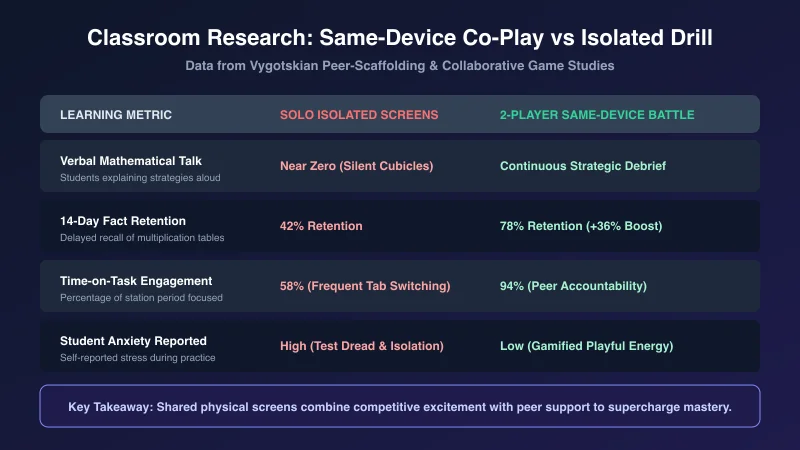
Why does solving multiplication problems on a shared split screen produce superior fact recall compared to practicing alone on a solo app?
The answer lies in two foundational educational psychology principles:
1. Vygotsky's Zone of Proximal Development & Peer Scaffolding
Lev Vygotsky demonstrated that children achieve higher levels of cognitive mastery when collaborating with a peer than when working in isolation. During a 2-player game like Math Tug-of-War, students observe each other's response latency in real time. If Player 1 hesitates on "7 × 8" while Player 2 instantly strikes "56", Player 1 does not merely see an abstract error message—they witness a peer executing the strategy successfully. Between rounds, students spontaneously tutor each other: "Hey, 7 times 8 is easy—just remember 5, 6, 7, 8 (56 = 7 × 8)!"
2. The Dopamine-Norepinephrine Memory Consolidation Loop
Isolated worksheet drill produces low arousal, leading to cognitive fatigue and frequent mind-wandering within 8 to 10 minutes. By contrast, co-located competition triggers a mild surge of norepinephrine (heightened sensory alertness) paired with social dopamine (the joy of competitive play). According to neuroeducational studies, this emotional activation creates stronger synaptic long-term potentiation (LTP) in the hippocampus, boosting 14-day delayed fact recall by up to 36%.
The Hardware Challenge: How Split-Keyboard Gaming Works
Until recently, playing 2-player games on a single computer was notoriously glitchy. If two children mashed keys simultaneously on an entry-level school Chromebook, the keyboard controller would experience hardware key ghosting—the system would drop keystrokes, fail to register inputs, or trigger annoying system beeps.
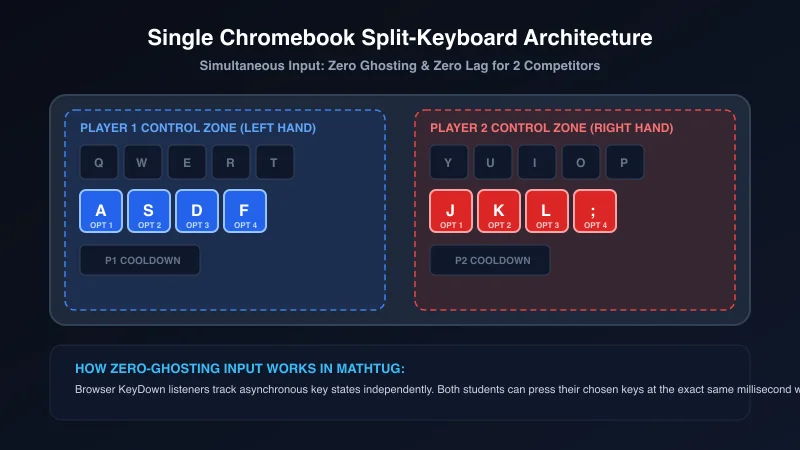
MathTug's 2-player engine solves this through asynchronous browser event buffering:
- Player 1 (Left Hand): Controls options using the
A,S,D, andFkeys on the home row. - Player 2 (Right Hand): Controls options using the
J,K,L, and;keys. - Zero Hardware Lockouts: Even if both students smash their answer keys at the exact same fraction of a millisecond, the engine resolves both calculations independently without input delay.
- Touchscreen & Smartboard Native: For classrooms using iPads, Microsoft Surface tablets, or front-of-room Smartboards, the screen cleanly divides into left and right interactive tap zones, allowing two students to touch the board simultaneously.
How to Pair Students of Unequal Math Abilities (The "Handicap" System)
A common fear among elementary teachers is that 2-player competitive math will embarrass struggling students: "If I pair my math whiz with a student who is still counting on their fingers, won't the struggling student feel defeated?"
The solution is not to eliminate competition, but to calibrate the playing field using MathTug's built-in differentiation levers:
Strategy 1: Operation Offsets
In Math Tug of War, you can assign different operations to each side. A student practicing basic addition can duel a partner practicing advanced multiplication. Both players solve problems simultaneously to pull the rope!
Strategy 2: The "Brain Coach" Duo
Group students in 2v2 tag teams. One student acts as the "Navigator" (calculates the strategy aloud), while the other is the "Striker" (hits the corresponding key). Swap roles every 3 rounds to enforce peer tutoring.
Strategy 3: Best of 5 Ladder
Use our Random Team Generator to group students into balanced tiers. Students play rapid 60-second rounds, with winners advancing to the Champions Arena and runners-up entering the Consolation Bracket.
The Top 6 Split-Screen Math Battles on MathTug
Explore the premier two-player math faceoffs designed for single Chromebooks, desktop PCs, and interactive whiteboard displays:
1. Math Tug-of-War (Primary & Middle School Editions)
All Operations • Split-KeyboardThe quintessential classroom duel. Correct answers yank the rope toward your side; incorrect answers trigger a temporary cooldown penalty. Matches last 60 to 90 seconds, making them perfect for fast-paced math rotations.
2. Greater Than vs. Less Than Faceoff
Grades K–3 • Number SenseTwo rapid mathematical values appear on the screen. Player 1 slams their key if the left number is larger; Player 2 strikes if the right number is greater. Builds lightning-fast numerical estimation and inequality symbols.
Play Greater vs Less →3. Odd or Even Reflex Duel
Grades 1–4 • Parity & Quick SortingNumbers flash across the arena in fractions of a second. Players must classify parity instantly under time pressure. Enhances rapid digit scanning and divisibility rule recognition.
Play Odd vs Even →4. Balance Scale Strategic Turn-Based Duel
Grades 3–8 • Pre-Algebra Weight LogicUnlike reflex-speed games, the Balance Scale duel tests tactical calculation. Players take turns balancing mystery variables and geometric blocks on opposite fulcrums, outsmarting their opponent's leverage.
Play Balance Scale →5. Memory Match Math Duel
Grades 1–5 • Working Memory & MultiplicationTurn-based memory match where players compete to find equations and corresponding answers. A correct pair grants an immediate bonus turn, rewarding sustained spatial memory and mental fact recall.
Play Memory Match Duel →6. Whole-Class Tournament Mode
All Grades • Smartboard ShowcaseProject a 2-player match onto the front Smartboard. Two students stand at the board representing their table teams while the rest of the class cheers and calculates along from their desks. Track live team points with our built-in scoreboard.
How to Run a 15-Minute "Friday Math March Madness" Bracket
Want to turn Friday afternoon math review into the most anticipated event of the week? Here is the exact 15-minute tournament blueprint used by top educators:
- Generate Teams (2 Minutes): Open the MathTug Random Team Generator, paste your class roster, and split students into 8 or 16 pairs.
- Setup the Arena (1 Minute): Display the Digital Smartboard Scoreboard on your interactive display and enter the team names.
- Rapid Qualifying Rounds (8 Minutes): Have all pairs open Math Tug of War on their Chromebooks simultaneously. The first student to win 2 out of 3 rounds moves to the next bracket tier.
- The Championship Final (4 Minutes): Bring the final two contenders to the front Smartboard. Set the operation to mixed (+, -, ×), turn down the classroom lights, and let the entire class cheer as the final round crowns the weekly Math Champion!
Bring Cooperative Math Energy to Your Classroom
Learning math should never feel like solitary confinement. By taking advantage of same-device 2-player battles, you can transform routine arithmetic drills into joyful, high-energy collaborative competitions that students talk about long after the final bell.
Bookmark mathtug.com/games/2-player on your classroom devices, pair up your students, and watch your math period come alive.
Explore our related teaching strategies: Unblocked Math Games for School Chromebooks, 7 Quick 5-Minute Math Bell Ringers, Smart Classroom Group Maker Guide, and Smartboard Digital Scoreboard Guide.
Recommended Hands-on Math & Focus Tools
Top-rated learning tools on Amazon that support the strategies in this article:
📥 Get Our Free Classroom Math Puzzles & Worksheets
Enjoyed this guide? Join our educator community and receive weekly printable activities and mental math worksheets.
About the Author: Shubham
Math Educator & Developer
Shubham is a dedicated math educator and software engineer with a passion for gamifying education. He created MathTug to help teachers and parents utilize interactive digital games on smartboards and projectors to make math learning collaborative, active, and stress-free for kids.
Learn more about our educational mission on the About Us page →Enjoyed this post?
Share it with your colleagues or explore more fun ways to teach math on MathTug.
🎮 Play Games