
Free Online Math Quiz Maker for Classrooms: Auto-Graded, No Student Logins & Chromebook Ready
Eliminate login friction and paper grading fatigue. Discover how K–12 teachers launch auto-graded math tests in 10 seconds with 1-click grade templates, Excel upload, instant Smartboard QR codes, 1-click CSV gradebook export, and official student certificates.

Every classroom educator knows the sinking feeling of a digital quiz day derailed by technical friction: "Teacher, what’s my password?", "My school Google account is blocked," or "The app says our class has reached its free participant cap." Before the first math equation is even attempted, 15 minutes of precious instruction time have vanished into thin air.
Meanwhile, the traditional alternative — printing 30 paper test sheets, marking them by hand with a red pen, and manually calculating percentages — consumes countless hours of evening and weekend time. Teachers are trapped in an exhausting tug of war between high-friction digital platforms and time-consuming manual grading.
Enter the MathTug Classroom Assessment Hub: an ultra-fast, 100% free online math test and quiz maker engineered specifically to eliminate friction. With zero student accounts or logins required, 1-click K–12 curriculum templates, instant Excel upload, smart automatic distractor generation, and 1-click CSV gradebook export, teachers can launch an assessment in under 10 seconds and watch live submissions roll in on a real-time classroom leaderboard.

Why Traditional Quiz Tools Fail in Elementary & Middle School Math
While mainstream platforms like Kahoot, Quizizz, and Google Forms are ubiquitous, classroom reviews and educational research reveal four glaring pain points when applied specifically to math instruction:
- Login Barriers & Privacy Restrictions (COPPA/FERPA): Requiring 3rd or 4th graders to log into individual accounts causes lost password delays and regulatory privacy headaches. Teachers need tools that collect zero personal data beyond a student's first name.
- Painful Equation & Math Formatting: Typing fractions, square roots, exponents, or geometry notation into standard web forms feels like writing code. Most quiz tools lack native math awareness and garble symbols.
- Paywalls & Restrictive Participant Caps: Popular freemium platforms frequently cap free games at 20 or 40 participants — making combined classes or grade-level reviews impossible — or lock essential features like CSV data export behind expensive district licenses.
- Speed Bias Over Mathematical Deliberation: Platforms that award extra points for split-second clicks inadvertently penalize reflective, careful mathematicians who pause to work through steps on scratch paper (Stanford math education researcher Dr. Jo Boaler has extensively documented how timer pressure exacerbates math anxiety).
💡 The Golden Rule of Modern Classroom EdTech:
If a digital assessment takes longer than 60 seconds to set up, or requires young students to authenticate with an email and password, it costs more instructional time than it saves. Zero-friction design always delivers higher academic engagement.
3 Zero-Friction Ways to Build a Classroom Math Test
Between morning duty, parent emails, and lesson transitions, teachers operate on razor-thin time margins. The MathTug Online Test Builder provides three tailored pathways to accommodate every teacher’s workflow:
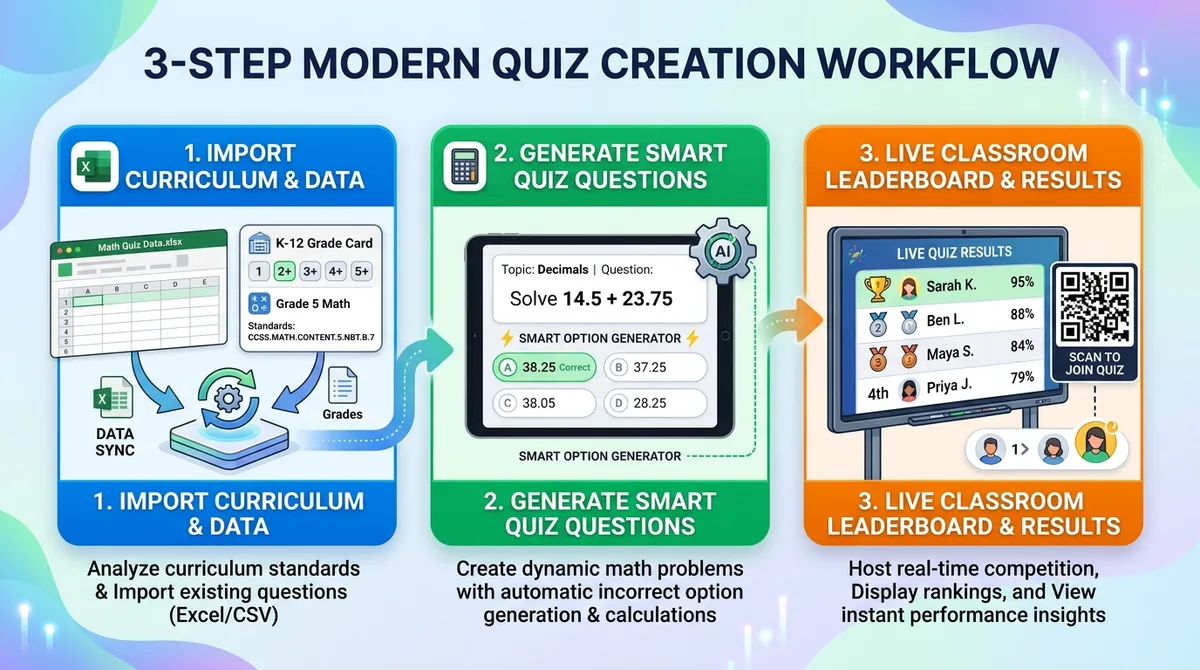
Method 1: 1-Click K–12 Curriculum Templates (Fastest — 10 Seconds)
Need a quick standards-aligned benchmark test right now? MathTug includes 13 ready-to-use curriculum tests spanning Kindergarten through High School:
- Kindergarten: Visual counting, number bonds within 10, and introductory addition/subtraction.
- Grade 1 & 2: Addition facts within 20, doubles, 2-digit mental math, and skip counting foundations.
- Grade 3 & 4: Times tables fluency (2–12x sprint), division facts, and multi-digit operations.
- Grade 5: Fractions (adding unlike denominators), decimal place values, and PEMDAS order of operations.
- Grade 6 & 7: Unit rates, simplified ratios, negative integers, and 2-step linear equations.
- Grade 8 to 12: Exponents, square roots, quadratics, angle theorems, logarithms, and pre-calculus limits.
Simply navigate to the K–12 Templates tab, select your grade level, and watch the test title and 10 Common Core-aligned questions populate automatically. Click "Publish & Launch", and your test room is live.
Method 2: 1-Click Instant Math Generators (Zero Typing)
If you need fresh mental math warm-ups or a Friday fact fluency check, the built-in Auto Generator creates 10 randomized, brand-new problems with mathematical distractors at the tap of a button:
- ✖️ Times Tables Fluency: 10 randomized multiplication facts from 2x2 to 12x12.
- ➕ Addition Practice: Mental 2-digit addition problems.
- ➖ Subtraction Mastery: Subtraction facts without duplicate entries.
- ➗ Division Practice: Whole-number division problems and remainders.
- 🍕 Fractions & Percentages: Visual fractions, simplifications, and percentage conversions.
- 📐 Pre-Algebra Basics: Linear one-step and two-step equations solving for
x.
Method 3: Upload Excel / CSV or Quick Paste (Bulk Mode)
Do you already have a test question bank in a Word document, Google Doc, or spreadsheet? You don't have to retype them one by one.
MathTug features a universal equation parser. Simply write questions in plain text using the format Question = Answer:
7 x 8 = 56
15 + 24 = 39
What is 25% of 200? = 50
Solve for x: 2x + 4 = 14 = 5
What is 1/2 + 1/4? | 3/4, 2/4, 1/8, 1/2 | 3/4
You don't even have to come up with wrong answers! If you just provide Question = Answer, MathTug's Smart Distractor Algorithm automatically calculates plausible mathematical distractors (e.g., for 7 x 8 = 56, it auto-generates 54, 64, and 48 based on typical student arithmetic mistakes).
You can also drag and drop any .xlsx or .csv spreadsheet directly, or click "Download Starter Template" inside the builder to grab a formatted starter file.
How Students Join: 3 Frictionless Methods
Once you hit Publish & Launch Quiz, you are presented with three instant options to distribute the test to your classroom:
1. Direct Link
Copy the unique link and post it directly to Google Classroom, Canvas, Schoology, or Microsoft Teams. Students click once and the quiz starts immediately without login.
2. 6-Letter PIN Code
Write the clean code (e.g. TUG-8421) on your dry-erase board. Students open mathtug.com/tests and enter the code.
3. Smartboard QR Mode
Click "Smartboard QR" to display a high-contrast QR code on your classroom projector. Students scan with Chromebook or iPad webcams in 2 seconds.
Real-Time Live Leaderboard & Instant Auto-Grading
Educational researcher John Hattie’s meta-analyses in Visible Learning show that **immediate, targeted feedback boasts a massive effect size of d = 0.73** on student achievement. Waiting three days for red-pen paper tests diminishes student reflection.
With MathTug, grading and feedback happen instantaneously in real time:
- Live Score Feed: Open the Teacher Live Leaderboard tab to watch student names appear the second they submit their answers.
- Automatic Accuracy Calculation: Each student’s score, time taken, percentage, and mastery status are automatically calculated.
- Immediate Formative Feedback: Students receive immediate feedback showing which questions they got correct and which need review, solidifying learning while the concepts are fresh in their minds.
- Local & Cloud Redundancy: Quizzes are stored safely in your browser’s local cache and synchronized across devices, so you never lose your class records even if school Wi-Fi fluctuates.
Two Unique MathTug Superpowers: 1-Click CSV Export & Offline Paper Print
Most commercial quiz platforms hide data export behind expensive paywalls and offer no fallback when classroom technology hiccups. MathTug bridges digital assessment with physical classroom reality through two powerful features:

1. 1-Click "Export Gradebook (CSV)"
Don't waste time typing numbers from your screen into your grading software. On the Live Results Leaderboard, simply click the "Export Gradebook (CSV)" button. MathTug downloads a clean spreadsheet containing:
- Student Class Rank
- Student Name
- Raw Score & Total Questions
- Percentage Accuracy
- Time Spent (in seconds)
- Mastery Status (Mastered / Needs Practice)
- Date & Timestamp
This CSV file imports directly into Google Classroom, PowerSchool, Canvas, or Microsoft Excel with zero manual formatting.
2. 1-Click "Print Paper Quiz & Answer Key"
What happens when a student's Chromebook isn't charged, or an absent student needs a paper makeup quiz, or school Wi-Fi goes down? You don't have to scramble to create a separate paper worksheet.
Click "Print Paper Quiz" in the test builder. MathTug instantly formats the quiz into a clean, photocopier-ready 8.5x11 paper test sheet featuring:
- Student Name, Date, and Score header fields.
- Multiple-choice checkboxes formatted for pencil completion.
- A clean, detachable Teacher Answer Key on the back page for quick grading.
Award Official Student Mastery Certificates (With Your School Name)
Recognition is one of the most powerful intrinsic motivators for young learners. When a student achieves the passing mastery goal (default 70% or 80%), MathTug automatically unlocks an Official Certificate of Mathematical Achievement.
Teachers can easily customize their credentials in the builder:
- School / Academy Name: Printed prominently across the header (e.g. "Lincoln Elementary School").
- Teacher Signature Line: Displays your name (e.g. "Mrs. Sarah Jenkins, Grade 4 Lead").
- 1-Click Classroom Printing: Print high-resolution certificates directly from your browser to hang on the bulletin board or send home to proud parents.
Feature Comparison: MathTug vs. Google Forms vs. Kahoot vs. Paper
Here is how MathTug compares to other classroom assessment methods when evaluated strictly for daily math instruction:
| Feature | MathTug Tests | Google Forms | Kahoot / Quizizz | Paper Worksheets |
|---|---|---|---|---|
| Student Login Required? | ❌ NEVER (0 Login) | Requires Google Account | Pushes Account Sign-in | ❌ None |
| Setup Time | ⚡ Under 30 seconds | 5 - 15 minutes manual entry | 5 - 10 minutes | Photocopying & collating |
| 1-Click K-12 Templates | ✅ 13 Ready-Made Grades | ❌ Must build from scratch | Mixed community bank | Varies by textbook |
| Smart Distractor Generator | ✅ Automatic (Math-Aware) | ❌ Must type every option | ❌ Manual option writing | N/A |
| Offline Printable Version | ✅ 1-Click with Answer Key | ❌ Clunky print output | ❌ Paywalled / Not designed for print | ✅ Physical sheet |
| CSV Gradebook Export | ✅ 100% Free 1-Click | ✅ Exports to Sheets | ❌ Often locked behind Premium | ❌ Manual gradebook entry |
| Printable Student Certificates | ✅ Included with School Name | ❌ Needs complex Apps Script | ❌ Paywalled / Unavailable | ❌ Requires separate printables |
| Cost for Classrooms | 🎉 100% Free Forever | Free with Google Suite | Freemium (aggressive paywalls) | Paper & toner costs |
Best Practices: How Teachers Use Online Math Tests Daily
Here are three proven instructional models used by elementary and middle school educators:
1. The 5-Minute Morning Math Warm-Up (Bell Ringer)
As students unpack their backpacks and boot up their Chromebooks, project the Smartboard QR Code on your front screen. Students scan the code, complete a 5-question mental math sprint, and view their immediate score. By the time morning attendance is done, you have a real-time pulse check on yesterday's lesson retention.
2. Low-Stakes Friday Fluency Checks
Replace high-stress weekly quizzes with a gamified 10-minute check. Students love knowing they are working toward their official printable certificate, while you get an instant roster of students who need targeted small-group intervention next week. For students with focus challenges or test anxiety, toggle the timer off in the settings for an ADHD-friendly untimed math experience.
3. Transition to 2-Player Classroom Battles
Did your students finish their quiz early? Send high-performing or energetic pairs to Math Tug of War or Classroom Battles for a fun, cooperative math cooldown while you assist students who need one-on-one coaching.
Ready to Launch Your First 10-Second Math Test?
You don't need a credit card, school district purchase order, or student email roster. Experience how fast and enjoyable classroom math assessments can be.
🚀 Create Your Free Classroom Quiz Now →
Related Classroom Guides & Resources:
- Digital Exit Tickets for Math: Complete Formative Assessment Guide
- Differentiated Math Instruction: 3-Tier MTSS Classroom Guide
- Unblocked Math Games for School Chromebooks: Safety & IT Whitelist Guide
- Split-Screen Math Battles: 2-Player Same-Device Classroom Duels
- 7 Quick 5-Minute Math Bell Ringers for Instant Morning Focus
- Free Printable Grade-by-Grade Math Worksheets with Answer Keys
Recommended Hands-on Math & Focus Tools
Top-rated learning tools on Amazon that support the strategies in this article:


📥 Get Our Free Classroom Math Puzzles & Worksheets
Enjoyed this guide? Join our educator community and receive weekly printable activities and mental math worksheets.
About the Author: Shubham
Math Educator & Developer
Shubham is a dedicated math educator and software engineer with a passion for gamifying education. He created MathTug to help teachers and parents utilize interactive digital games on smartboards and projectors to make math learning collaborative, active, and stress-free for kids.
Learn more about our educational mission on the About Us page →Enjoyed this post?
Share it with your colleagues or explore more fun ways to teach math on MathTug.
🎮 Play Games